
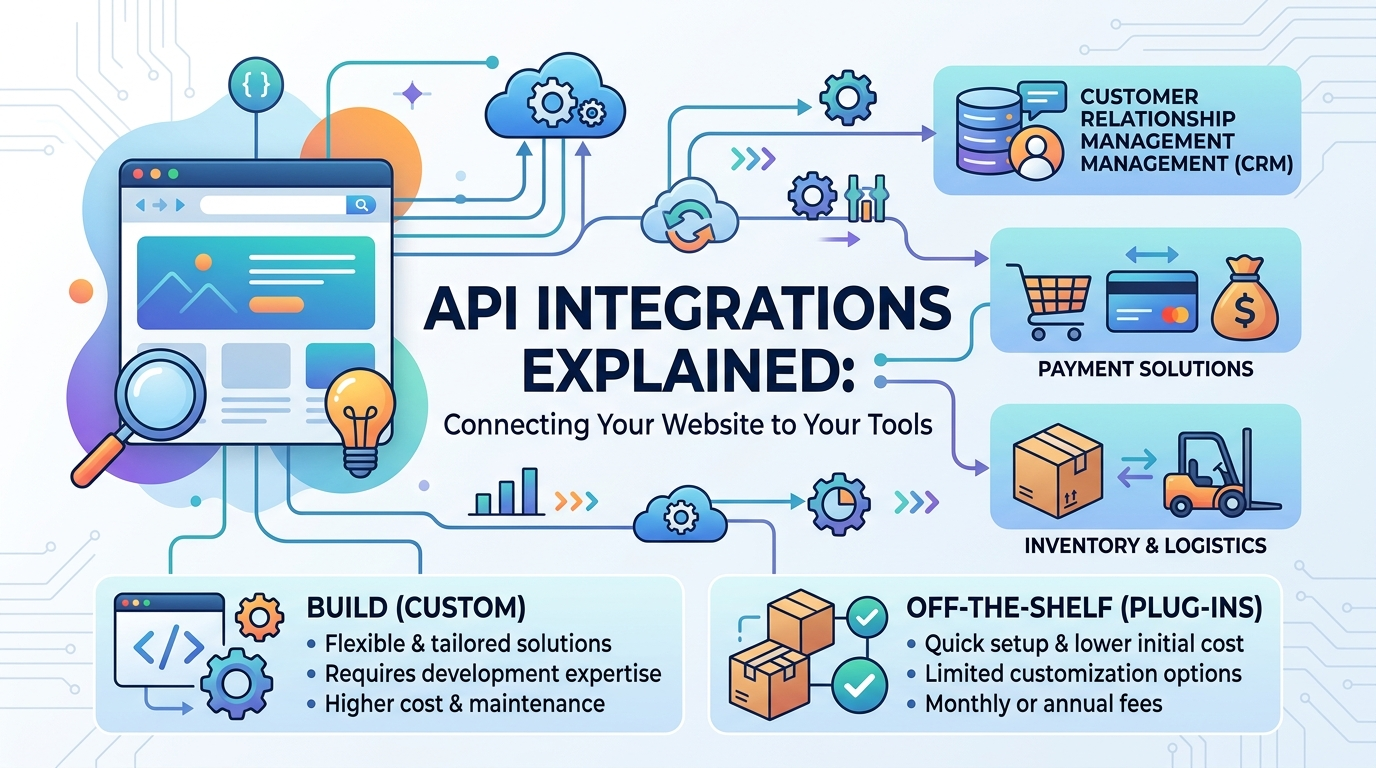
Most businesses run their operations across several separate tools — a CRM for managing customer relationships, an accounting platform for invoicing, an email marketing service, maybe an inventory system — and the website sits somewhat disconnected from all of them, requiring someone to manually copy information back and forth. Website API integrations exist specifically to close that gap, letting a website and a business’s other software talk to each other directly rather than depending on manual data entry to keep everything in sync. For an IT manager evaluating whether a specific integration is worth the investment, or a business owner simply trying to understand what a developer means by “we can integrate that,” understanding what an API integration actually does in practice makes the decision considerably easier.
What an API Integration Actually Does (In Plain Terms)?
The Restaurant Analogy: APIs as a Waiter Between Systems
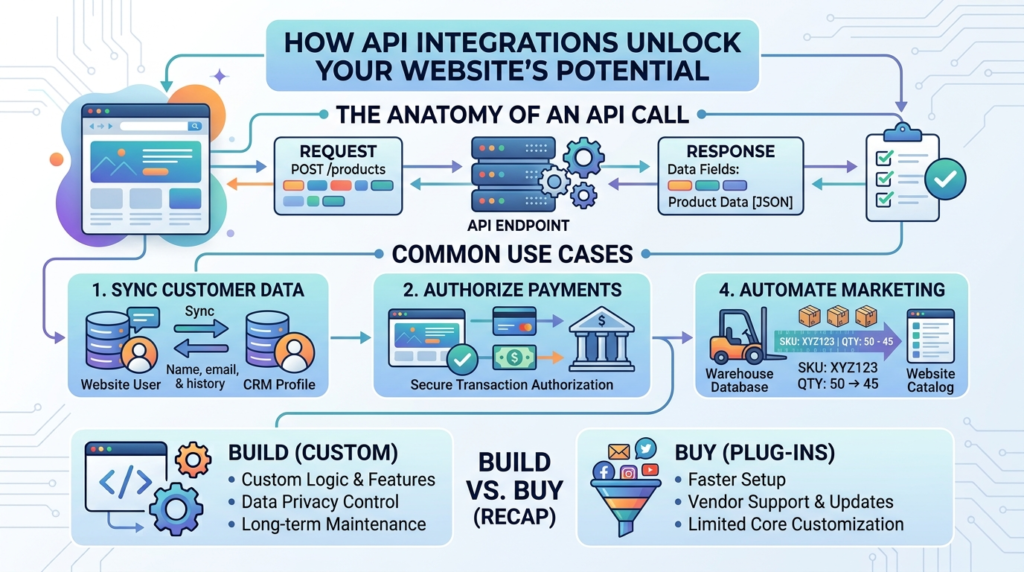
An API (application programming interface) functions like a waiter in a restaurant: the kitchen (one system) has information and capabilities the dining room (another system) needs access to, and rather than a customer walking into the kitchen directly, the waiter carries specific, structured requests back and forth between the two. When a website needs to check a payment gateway’s approval status, or pull a customer’s order history from a CRM, it doesn’t reach directly into that other system’s internal database — it sends a structured request through the API, and the API sends back exactly the information requested, nothing more.
Why This Matters Even If You’re Not Technical?
Understanding this basic mechanism matters for non-technical decision-makers because it clarifies what an integration actually promises: two systems exchanging specific, defined pieces of information automatically, rather than some vague notion of systems “working together.” This distinction helps when evaluating a developer’s proposal or a vendor’s claims, since a genuinely useful integration should be describable in concrete terms — what specific data moves, in which direction, and triggered by what event — rather than staying abstract.
Common Integrations Businesses Actually Need
CRM Integration
Connecting CRM to website functionality typically means that when someone fills out a contact form, requests a quote, or makes a purchase, that information flows automatically into the CRM as a new or updated contact record, rather than requiring someone to manually re-enter it. This is one of the most commonly requested integrations because the alternative — manual data entry from web forms into a CRM — is exactly the kind of repetitive, error-prone task automation is built to eliminate, and the lag between a lead submitting a form and that lead reaching a salesperson’s CRM view can directly cost a business real revenue.
Payment Gateway Integration
A payment integration allows a website’s checkout process to communicate directly with a payment processor (Stripe, PayPal, a regional payment gateway) to securely process transactions, confirm payment status, and trigger the appropriate order fulfillment actions once payment clears. This integration needs particular care around security and compliance, since it handles sensitive financial data, which is why using established, well-documented payment gateway APIs rather than attempting to build custom payment handling from scratch is standard practice across the industry.
Inventory and ERP Integration
For businesses selling physical products, an ERP integration or dedicated inventory system connection keeps stock levels synchronized between the website and the actual warehouse or point-of-sale system, preventing the common and costly problem of a website selling products that are actually out of stock. This kind of business software integration becomes increasingly important as a business’s sales channels multiply — a business selling through its website, a physical store, and a third-party marketplace simultaneously needs inventory data flowing accurately across all three, or risks overselling and damaging customer trust.
Email and Marketing Automation Integration
Connecting a website to an email marketing platform allows customer actions on the site (a newsletter signup, an abandoned cart, a completed purchase) to automatically trigger the appropriate email sequence without manual list management. This integration typically relies on webhooks specifically, since email automation needs to respond to events as they happen in real time rather than through a periodic manual data export and import process.
Webhooks and Middleware: The Pieces That Make Integrations Work
How Webhooks Keep Systems in Sync in Real Time?
A webhook is a mechanism that lets one system automatically notify another system the moment something specific happens, rather than the second system having to repeatedly check whether anything has changed. When a customer completes a purchase, a webhook can immediately notify the CRM, the inventory system, and the email platform simultaneously, all without any of those systems needing to poll for updates on a schedule. This event-driven approach is generally faster and more efficient than systems that check for updates at fixed intervals, and it is the mechanism most modern business software integration relies on for real-time behavior.
When Middleware Becomes Necessary?
Middleware is software that sits between two or more systems specifically to translate, route, or transform data as it moves between them, and it becomes necessary when the systems being connected don’t speak the same “language” natively — different data formats, different authentication methods, or business logic that needs to be applied to the data before it reaches its destination. A business connecting several different tools that were never designed to work together often needs a middleware layer to make those connections reliable, rather than trying to force each system to integrate directly with every other one.
Build vs. Off-the-Shelf Connector: Which Approach Fits
When a Pre-Built Connector (Zapier, Make, Native Plugins) Is Enough?
For straightforward integrations between popular, well-known tools, a pre-built connector platform like Zapier or Make, or a native plugin built specifically for a particular website platform, is usually the faster and more cost-effective solution. These tools handle common integration patterns (new form submission triggers a CRM contact, new order triggers an email) without requiring custom development, and they are the sensible starting point for most small to mid-sized businesses whose integration needs fit within these common, well-supported patterns.
When Custom API Development Is the Better Investment?
Custom development becomes the better investment when the specific integration involves business logic too particular to the company to fit a generic connector template, when data volume or complexity exceeds what pre-built tools can reliably handle, or when connecting systems that don’t have existing pre-built connectors available at all. An IT manager evaluating this decision should weigh the ongoing subscription cost of a pre-built connector platform against the one-time (but higher) cost of custom development, since at sufficient scale or complexity, custom development often becomes the more economical long-term choice despite its higher upfront cost.
Evaluating Third-Party Integrations Before Committing
What to Check Before Choosing a Connector or Provider?
Before committing to any third-party integrations, checking the specific provider’s uptime track record, API rate limits (how many requests can be made in a given time period), and support responsiveness prevents unpleasant surprises after a business has already built a dependency on that connection. A payment gateway or CRM with a poor API reliability history can turn a helpful integration into a recurring operational headache, regardless of how well the integration itself was built on the business’s side.
Understanding API Rate Limits and Usage Costs
Many third-party integrations, particularly those built on usage-based pricing, impose rate limits or per-request costs that can become significant at scale even when they seemed negligible during initial testing. A business planning to rely heavily on a specific integration should model expected usage volume against the provider’s actual pricing structure before committing, since an integration that seemed inexpensive during a low-volume pilot can become a meaningful ongoing cost once the business scales the volume of data flowing through it.
Planning an Integration Project With Your Development Team
Documenting Requirements Before Development Starts
A common source of integration project delays is starting development before clearly documenting exactly which data needs to move, in which direction, and under what conditions. Spending time upfront to map out these specifics — even in a simple document listing each data field and its source and destination — saves considerably more time during development than discovering these requirements piecemeal as the project progresses.
Testing Integrations Thoroughly Before Launch
Integration bugs often only surface under specific edge-case conditions — a payment that partially fails, a CRM contact that already exists under a different email, a webhook that arrives out of order — which is why thorough testing across realistic scenarios matters more for integration projects than for many other types of development work. A business that skips this testing phase to launch faster often discovers these edge cases in production, where the cost of fixing them is considerably higher than catching them beforehand.
Frequently Asked Questions
Most common integrations between popular tools can be handled with existing connector platforms or native plugins without custom development. Custom API development becomes necessary specifically when the integration involves unique business logic, unsupported systems, or complexity beyond what generic connector tools can reliably manage.
API documentation is the reference material a software provider publishes explaining exactly what data and actions their API makes available and how to request them correctly. Well-documented APIs make integration development considerably faster and more reliable, while poorly documented APIs often require extensive trial and error, which is worth factoring into project timeline estimates.
This varies enormously based on complexity, from a same-day setup using a pre-built connector for simple integrations, to several weeks for custom development connecting complex, poorly documented, or numerous systems. Getting a specific estimate requires understanding the exact systems and data flows involved rather than treating “integration” as a single standardized task.
Yes, when done using established, secure API practices — proper authentication, encrypted data transmission, and following the payment or software provider’s official integration guidelines rather than attempting workarounds. Using well-established, widely trusted APIs rather than obscure or unofficial methods is the standard way to keep these connections secure.
This is a genuine ongoing consideration with any integration — API providers do update their systems, sometimes requiring corresponding updates on the integrated side. This is part of why ongoing maintenance should be factored into any integration project’s total cost, rather than treating the initial build as a one-time expense with no future upkeep required.
Ready to Connect Your Website to the Tools You Already Use?
Website API integrations eliminate the manual data entry and disconnected systems that quietly cost growing businesses time and revenue. Creative 4 All builds and manages CRM, payment, inventory, and marketing integrations for businesses across Lebanon and the GCC, choosing the right approach for each specific need. Discuss Your Web Application Project to see which integrations would actually save your business time.