

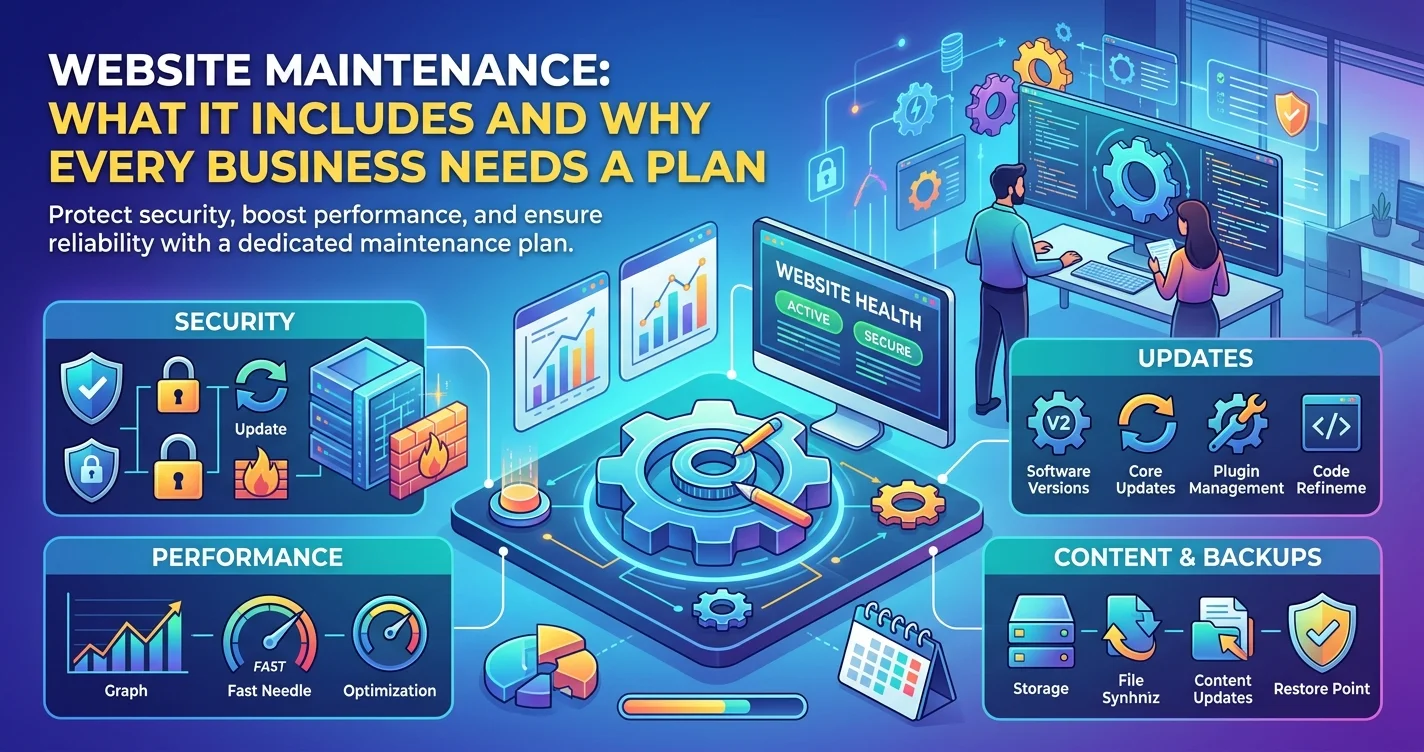
A website is often treated like a finished project: designed, built, launched, and then largely forgotten until something breaks. The trouble is that a website is not a printed brochure. It runs on software that needs updating, on servers that can fail, and on a changing environment of browsers, devices, and security threats that never stops moving. A business that launches a good site and then leaves it untouched is not saving money so much as deferring costs, which tend to arrive later as emergency repairs. A website maintenance plan turns that unpredictable risk into a predictable routine. This article explains what maintenance actually includes, what happens without it, how DIY compares with managed support, and how to choose a plan sensibly.
What Website Maintenance Actually Includes?
Security Updates and Patching
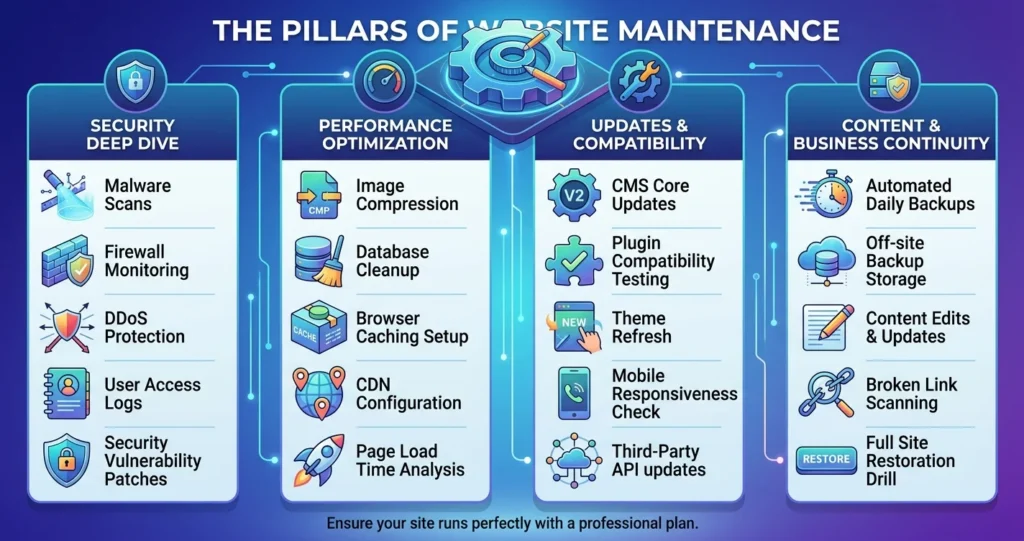
Most business websites run on a content management system with a collection of plugins, themes, and extensions, and each of these is software that periodically releases updates, including fixes for newly discovered security weaknesses. Applying these updates promptly, often called security patching, closes the gaps that attackers look for, and a site running outdated components is generally easier to compromise than one kept current. Maintenance also typically covers keeping security certificates valid, reviewing user accounts and permissions, and watching for signs of suspicious activity.
Backups and Recovery
Backups are the safety net that makes every other problem recoverable. A sound backup routine saves copies of the website’s files and database on a regular schedule, stores them somewhere separate from the live server so that a single failure cannot take out both, and, importantly, is tested occasionally to confirm that a backup can actually be restored. A backup that has never been tested is an assumption rather than a safeguard, and discovering that it does not work in the middle of a crisis is the worst possible time to find out.
Uptime and Performance Monitoring
Uptime monitoring checks the site at regular intervals and alerts someone when it goes down, so that outages are discovered by the business rather than by customers. Performance monitoring looks at how quickly pages load and whether anything has slowed over time, since a site can degrade gradually as content accumulates and components age. Catching these changes early allows a fix before visitors start leaving and search visibility suffers.
Content and Functional Updates
Maintenance also covers the ordinary upkeep of a living site: updating opening hours, prices, staff, and offers; fixing broken links; checking that contact forms, checkout flows, and booking tools still work after updates; and making small design or content changes as the business evolves. These routine changes are easy to postpone, but a site showing outdated information or a form that silently stopped delivering inquiries can cost real business without anyone noticing.
The Risks of an Unmaintained Website
Security Exposure
The most serious risk of neglect is security. An outdated site can be used to steal data, host malicious content, or send spam, and the consequences range from a defaced homepage to lost customer trust and the effort of cleaning up and recovering. Because many attacks target known weaknesses automatically, a site does not need to be a prominent target to be affected, which is why small businesses are not immune simply because they are small.
Performance, SEO, and Trust Decay
An unmaintained site tends to get slower, accumulate broken links and errors, and fall behind current browser and device standards. Search engines and visitors both notice, and rankings, conversions, and credibility can slip gradually enough that the cause is hard to identify. A site that looks neglected also quietly signals to potential customers that the business itself may be neglectful, which is a poor impression to leave.
The Cost of Emergency Repairs
Fixing a hacked or broken site in a crisis is usually more expensive, more stressful, and more disruptive than steady upkeep, since it often involves urgent work, lost sales while the site is down, and sometimes rebuilding from scratch if no usable backup exists. Seen this way, a maintenance plan is less a new expense than a way of paying a small, predictable amount to avoid a large, unpredictable one. The exact figures vary widely by site and business, so the comparison is worth working through for your own situation.
DIY vs Managed Maintenance
When DIY Is Reasonable?
A small, simple site with a competent in-house person can reasonably be maintained internally, particularly if updates are applied on a regular schedule, backups are automated and tested, and someone is genuinely responsible for monitoring. The key requirement is consistency: DIY maintenance tends to fail not because the tasks are difficult but because they are easy to postpone when everyone is busy.
When Managed Maintenance Makes Sense?
Managed maintenance makes sense when the site is important to revenue, when it is complex (ecommerce, integrations, custom functionality), or when nobody in the business has the time or skill to look after it reliably. Handing the routine to specialists gives the business predictable upkeep, faster response when something goes wrong, and someone accountable for the result, freeing the team to focus on running the business rather than on keeping the website healthy.
How to Choose a Website Maintenance Plan?
What to Look For in the Scope?
When comparing plans, look for clarity about exactly what is included: how often updates are applied, how often and where backups are stored, whether uptime is monitored and who is alerted, whether security scanning is part of the service, how many hours of content or design changes are included, and whether reporting is provided. A good plan describes its scope specifically rather than in vague promises, and it is clear about what falls outside it and how additional work is handled.
Questions to Ask Before Signing
A handful of questions help separate dependable providers from vague ones. How quickly will you respond if the site goes down? Have you tested restoring from backups, and how long does a restoration take? How are updates tested before going live, so that they do not break the site? What happens if the site is hacked, and is cleanup included? Who owns the accounts and credentials? And what are the terms for ending the arrangement? Clear, confident answers are a good sign; evasiveness is a reason for caution.
Website Support Services and Ongoing Website Maintenance Working Together
Maintenance Versus Support
It helps to distinguish the routine upkeep that keeps a site healthy from the responsive help needed when something specific goes wrong or a change is needed. Many providers bundle website support services with a maintenance plan so that routine tasks and on-demand requests are handled by the same team, which avoids the delays of explaining the site to a new person each time.
Planning for Ongoing Website Maintenance as the Site Grows
A site’s needs change as the business grows: more content, more traffic, new features, and more integrations all raise the stakes. Treating ongoing website maintenance as a service that is reviewed periodically, rather than a fixed arrangement set once, ensures the level of support keeps pace with the importance of the site to the business.
A Typical Maintenance Rhythm
What Happens Continuously, Monthly, and Quarterly?
A practical maintenance routine is easiest to understand as three layers. Some tasks run continuously or daily in the background, such as uptime monitoring and automated backups. Others happen on a regular cycle, often monthly, such as applying software updates after testing them, reviewing security reports, checking that forms and checkout flows still work, and fixing broken links. A deeper review each quarter looks at performance trends, unused plugins and accounts that can be removed, and whether the site still matches the needs of the business. These cadences are common starting points rather than fixed rules, and a larger or higher-risk site may warrant tighter intervals.
Why a Written Schedule Helps?
Putting the rhythm in writing, with clear ownership of each task, is what turns good intentions into reliable practice. Whether maintenance is handled in-house or by a provider, a documented schedule makes it obvious what has been done, what is due, and who is responsible, and it makes gaps visible before they become problems.
Frequently Asked Questions
Typically it includes security updates and patching, regular backups with tested recovery, uptime and performance monitoring, and routine content and functional updates. The exact scope varies by provider and plan, so it is worth confirming each item rather than assuming it is covered.
Routine tasks such as monitoring and backups usually run continuously or on a daily or weekly schedule, while updates and checks are often applied monthly, with a deeper review each quarter. The right rhythm depends on how large and how important the site is.
For a small, simple site and someone with the time and skill to do it consistently, yes. For a site that matters to revenue or has complex features, managed maintenance usually offers more reliability and a faster response when problems occur.
Recovery typically involves identifying and removing the compromise, restoring clean files, and fixing the weakness that allowed it, which is much easier with a recent, working backup. Without one, recovery can be slow, costly, and in some cases may mean rebuilding parts of the site.
Compare what is specifically included rather than the price alone, check how quickly the provider responds to problems, and consider what an outage or security incident would cost your business. A plan that clearly covers the essentials and responds reliably is usually better value than a cheaper one with a vague scope.
Ready to Protect Your Website With a Maintenance Plan That Fits?
A website maintenance plan is a small, predictable investment that protects the site your business depends on from avoidable security, performance, and reliability problems. Creative 4 All provides ongoing website maintenance and support for businesses across Lebanon and the GCC, from routine updates and backups to monitoring and prompt help when something goes wrong. Request a Website Quote to find out what a maintenance plan for your site would involve.