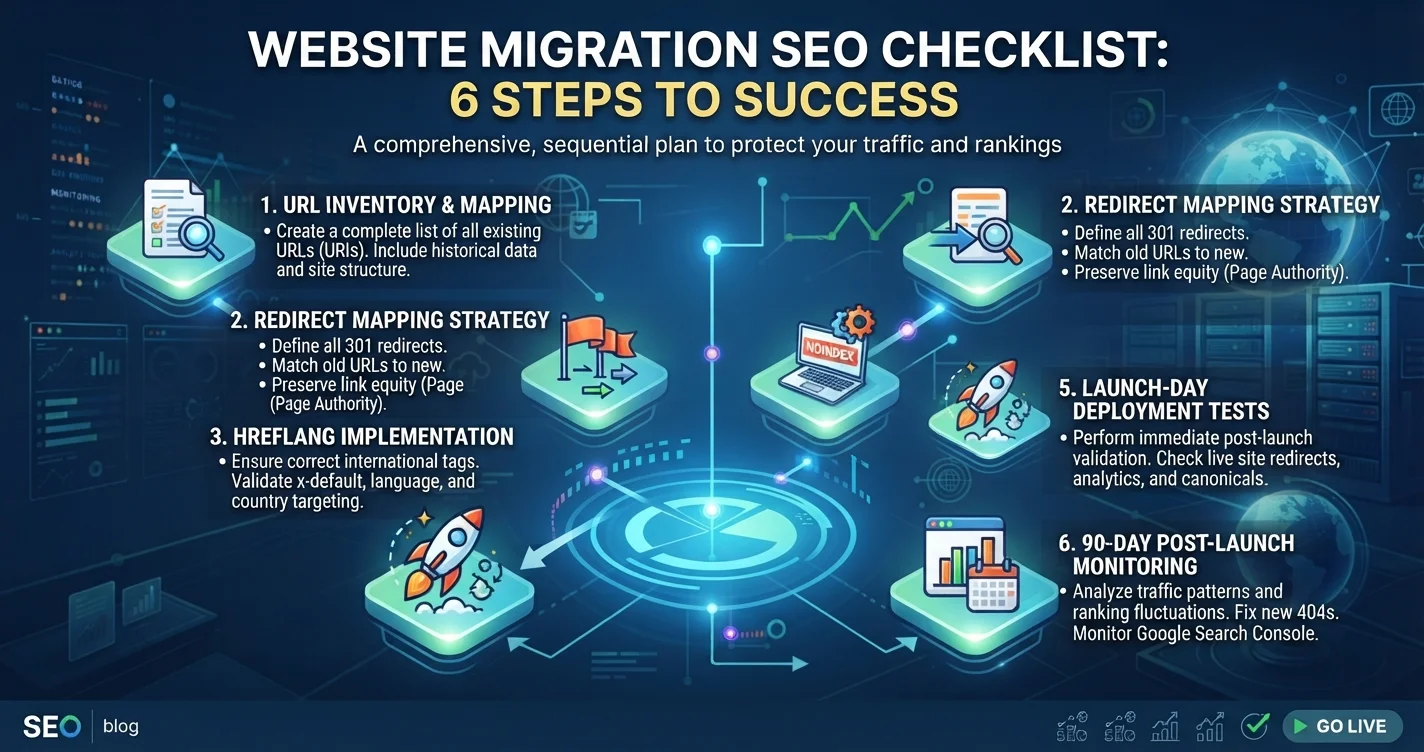
A new website should be a fresh start, not a reset. Yet one of the most common calls SEO consultants receive goes like this: “We launched the new site last month, it looks great, and our Google traffic has halved.” Behind it is usually the same story. The old URLs changed, nobody mapped them to the new ones, the staging site’s “do not index” setting went live, and months of rankings disappeared in a weekend.
A c prevents that. Whether you are redesigning, moving from WordPress to Shopify, switching to a new domain, adding Arabic and French versions or merging two websites, the steps below protect the rankings and traffic you have already earned. This guide walks through what to do before, during and after launch, in the order an experienced SEO team would do it.
What Counts as a Website Migration?
For SEO purposes, a migration is any change that affects how search engines find, crawl or understand your pages. The most common types are:
- Redesigns that change URLs, navigation, templates or content.
- Platform changes (replatforming), such as WordPress to Shopify, or a custom build to a CMS.
- Domain changes, including rebrands, ccTLD to .com moves, or merging domains.
- Structure changes, such as adding language folders or moving from HTTP to HTTPS.
- Hosting moves that change server performance or configuration.
Each carries risk, and combining several at once, for example a new domain, platform and design launched together, multiplies it. If you can, separate major changes into phases so problems are easier to isolate. Our website redesign checklist covers the design and business side; this article focuses on the SEO side.
Phase 1 of the Website Migration SEO Checklist: Benchmark Everything
The most important work happens weeks before launch. You cannot protect what you have not measured.
Build a Complete URL Inventory
List every URL that matters on the current site: pages in your XML sitemap, URLs found by a full crawl with a tool such as Screaming Frog or Sitebulb, pages receiving organic clicks in Search Console over the last 12 to 16 months, pages with backlinks from external sites, and landing pages used in ads or email campaigns. Combine these into one spreadsheet. Pages that appear in any of these sources must be accounted for.
Record a Performance Baseline
Export Search Console performance data by page and query, GA4 organic sessions and key events by landing page, current rankings for your most important keywords and a crawl of the old site, including titles, meta descriptions, headings, canonical tags and structured data. After launch, this baseline is how you will know whether something went wrong and where.
Identify Your Most Valuable Pages
Sort the inventory by organic clicks, conversions and backlinks. The top pages, often a small share of the site, deliver most of the value. These pages deserve the most careful treatment: equivalent content, matching or improved on-page elements and exact one-to-one redirects.
Phase 2: Redirect Mapping
Redirect mapping is the heart of any SEO migration plan. It tells search engines and visitors where every old URL now lives.
Map One-to-One Wherever Possible
Each old URL should redirect with a permanent 301 (or 308) redirect to the most relevant new URL, ideally the page that replaces it with equivalent content. Avoid redirecting large groups of pages to the homepage; Google tends to treat irrelevant redirects like missing pages, and visitors land somewhere useless.
Handle Removed Content Deliberately
If a page has no equivalent on the new site, decide case by case. Redirect it to the closest relevant page if one exists; otherwise let it return a 404 or 410. Retiring weak, outdated content during a migration is fine, as long as the decision is intentional rather than accidental.
Avoid Redirect Chains and Loops
If old URLs already redirect elsewhere, update those rules so every legacy URL goes directly to its final destination in one step. Chains slow crawling and dilute signals, and loops break pages entirely.
Plan for Platform Constraints
Replatforming SEO often involves URL structures you cannot fully control. Shopify, for example, places products under /products/ and categories under /collections/, so a move from WordPress or a custom store almost always changes product URLs. Build the redirect map around the new platform’s rules from the start, rather than discovering them after launch.
Phase 3: Build and Test on Staging
Protect the Staging Site
Keep the staging site out of search results with password protection or a noindex setting, but write down exactly how it is blocked, because removing that block at launch is one of the most frequently forgotten steps.
Preserve On-Page SEO
For important pages, carry over or improve titles, meta descriptions, headings, body content, image alt text and structured data. Redesigns often shorten content or remove text that was quietly driving rankings. Compare old and new versions of your top pages side by side.
Check Technical Foundations
Crawl the staging site and confirm canonical tags point to the new URLs, internal links use final URLs rather than old ones that redirect, the XML sitemap lists only new indexable URLs, robots.txt does not block important sections, and page speed and Core Web Vitals are at least as good as before. Our technical SEO audit checklist lists the checks in detail.
Multilingual Sites: Map Every Language
If your site has English, Arabic and French versions, each language needs its own redirect map, and hreflang annotations must reference the new URLs in every language. Arabic URLs deserve special attention, because long Arabic slugs may be truncated or encoded differently on the new platform. Our guide to multilingual SEO covers hreflang setup.
Migrate Tracking
Reinstall GA4 and Google Tag Manager, recreate key events such as form submissions and WhatsApp clicks, and test them on staging. Many migrations “lose” leads simply because tracking was not moved, not because the leads stopped.
Phase 4: Launch Day
Launch at a quiet time, never just before a major campaign or seasonal peak. Then work through this sequence:
- Remove staging blocks: password, noindex and any robots.txt disallow rules.
- Deploy redirects and test a sample of top URLs, plus a random sample of others.
- Submit the new XML sitemap in Search Console.
- Check key pages live: indexability, canonical tags, hreflang and tracking.
- Use the Change of Address tool in Search Console if you moved to a new domain.
Keep the old sitemap available for a short period as well, which helps Google discover the redirects. Use URL Inspection to request indexing of the most important new pages.
Domain Change SEO: Extra Steps
Domain change SEO adds a few requirements. Keep ownership and renewal of the old domain, because letting it expire would break every redirect and backlink. Google recommends keeping redirects in place for a long period, at least a year, and in practice it is wise to keep them indefinitely. Verify both old and new domains in Search Console, update your Google Business Profile, social profiles and directory listings, and contact sites that link to you most frequently to ask them to update their links.
Phase 5: The First 90 Days
Some fluctuation after a migration is normal while Google recrawls and processes the changes. What matters is spotting real problems early.
In the first week, check Search Console daily for crawl errors, 404s and indexing issues, and fix broken redirects immediately. In the first month, compare organic traffic, clicks and key events by page against your baseline, focusing on the top pages you identified earlier. By the end of three months, most well-executed migrations have recovered or improved. If traffic is still significantly down, revisit the redirect map, content changes and technical setup systematically. Our guides to fixing a website not indexed by Google and using Google Search Console explain the reports to use.
Mistakes a Website Migration SEO Checklist Prevents
The same mistakes appear again and again:
- No redirect map, or redirecting everything to the homepage.
- Staging noindex left on after launch.
- Content stripped from top pages during the redesign.
- Tracking not migrated, so leads appear to vanish.
- Too many changes at once, making problems impossible to isolate.
Each is preventable with planning, and each is far more expensive to fix after launch than before.
Using This Website Migration SEO Checklist
Treat this website migration SEO checklist as a project document shared between the business, the design and development team and whoever owns SEO. Assign an owner to each phase, set a go/no-go review before launch and agree in advance who checks Search Console and analytics each day in the first week. Migrations fail less from lack of knowledge than from lack of ownership.
Frequently Asked Questions
Not necessarily. With a complete URL inventory, one-to-one redirects, preserved content and careful launch checks, most migrations see only short-term fluctuation. Significant losses usually come from missing redirects, removed content or indexing settings left on.
Well-planned migrations often stabilise within weeks, and many recover fully within a few months. Large sites and domain changes can take longer. If traffic is still well below baseline after three months, investigate the redirect map and technical setup.
No, except where the homepage genuinely replaces the old page. Redirect each old URL to its most relevant new equivalent; if none exists, a 404 or 410 is usually better than an irrelevant redirect.
Google recommends keeping them for a long period, at least a year, and keeping them indefinitely is the safest choice. Also keep renewing the old domain so redirects and existing backlinks continue to work.
It should cover a URL inventory, performance baseline, redirect map, staging checks for content and technical SEO, tracking migration, launch-day steps, domain-change tasks if relevant, and 90 days of monitoring with clear owners for each phase.
Launch Your New Website Without Losing What You Built
A website migration does not have to cost you traffic. With a clear plan, a complete redirect map, careful staging checks and disciplined monitoring, a new site can keep its rankings and often improve them. The website migration SEO checklist above turns a risky launch into a controlled project.
If you are planning a redesign, a platform change or a domain move, the Creative 4 All team can review your migration plan, build the redirect map and monitor the launch across English, Arabic and French versions. Explore our web design and development services in Lebanon and request a free website review and estimate .