

A website not indexed by Google is one of the most frustrating problems a business can face, because nothing looks broken from the outside. It is a scenario that comes up often: a business launches a polished new website, the announcement goes out on Instagram, and a month later searching for the company’s own name still shows only its old Facebook page. Very often the cause takes minutes to find, such as a single WordPress checkbox ticked during development to keep the staging site private and never unticked. Every page is then telling Google to stay away.
When you have a website not indexed by Google, the cause is often something just as simple. Sometimes it is not, and the problem is quality, duplication or the way the site is built. This guide walks you through how to confirm what is happening, how to read the reports Google gives you, and how to fix each common cause, in the order an experienced SEO would check them.
First, Confirm the Problem
Before changing anything, make sure you are diagnosing the right issue. “My site isn’t showing on Google” can mean three very different things: Google has never indexed the pages, Google indexed them but they rank too low to find, or Google indexed some pages and ignored others. The fix for each is different.
Why the site: Search Is Only a Rough Check?
Typing
site:yourdomain.com
into Google gives a quick impression of whether anything is indexed. It is useful as a first glance, but it is not a precise count and it does not explain why a page is missing. If the search returns nothing at all, you almost certainly have a site-wide block. If it returns some pages, you need better data.
Use the URL Inspection Tool in Search Console
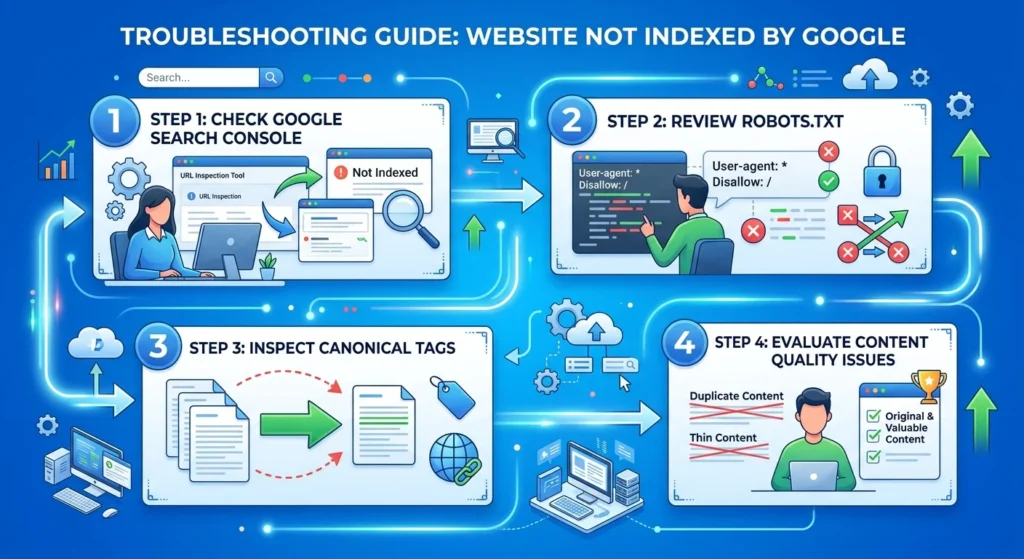
The reliable answer comes from Google Search Console. If you have not verified your site yet, do that first; it is free and takes a few minutes with a DNS record or an HTML tag. Then paste a page address into the URL Inspection bar at the top. Google will tell you whether the “URL is on Google” or “URL is not on Google”, and when it is not, it gives a reason. That reason is the starting point for everything else in this guide.
How Google Indexing Works in Plain Terms?
Understanding the pipeline makes the diagnosis much easier. Google first has to discover a URL, usually through links from other pages or through your XML sitemap. It then crawls the page, which means Googlebot fetches and renders it. Finally, it decides whether to index it, meaning store it so it can appear in results. Ranking is a separate step that only happens for indexed pages.
A page can fail at any of these stages. A brand-new site with no links may not be discovered quickly. A page may be discovered but not yet crawled. A page may be crawled and then deliberately left out of the index. Each failure shows up differently in Search Console, which is why reading the reports carefully saves so much time.
Reading the Page Indexing Report
In Search Console, open Indexing → Pages. The chart shows indexed and not indexed pages, and the table underneath, titled “Why pages aren’t indexed”, groups the missing URLs by reason. Not every entry is a problem. Redirected URLs, deliberate noindex pages and alternate versions with a proper canonical tag are supposed to be excluded. Focus on reasons that affect pages you actually want in search.
Crawled – Currently Not Indexed
This status means Google fetched the page and chose not to index it. It is usually a quality or value signal rather than a technical error. Thin pages, near-duplicate pages, auto-generated text and pages with little that differs from content already indexed elsewhere often end up here. The fix is editorial: make the page genuinely useful, merge it with a stronger page, or remove it if it serves no purpose.
Discovered – Currently Not Indexed
Here Google knows the URL exists but has not crawled it yet. Google’s own Search Relations team has explained that this is not necessarily an error; the URL is waiting in a queue. If the status persists, look at two things. First, server health: the Crawl Stats report (under Settings) shows whether your server responds slowly or with errors, which makes Google crawl less. Second, overall quality: if Google sees a pattern of thin content across a site, it may be slower to crawl more of it.
Excluded by “noindex” Tag
The page carries a
noindex
instruction, either in a meta robots tag or an HTTP header. If the page should be in search, remove it. On WordPress, check Settings → Reading → Search engine visibility, then check your SEO plugin’s settings for the page type, because plugins can apply noindex to whole categories of pages.
Blocked by robots.txt
Your robots.txt file tells Google not to crawl certain paths. This blocks crawling, not necessarily indexing, so you may even see a URL listed in results with no description. Two rules matter here. If you want a page indexed, do not block it in robots.txt. If you want a page kept out of the index, use noindex instead, and do not block it in robots.txt at the same time, because Google cannot see a noindex tag on a page it is not allowed to crawl.
Duplicate and Canonical Issues
Statuses such as “Duplicate, Google chose different canonical than user” mean Google considers another URL the main version of this content. This happens with parameter URLs, HTTP and HTTPS versions, trailing-slash variations, printer-friendly pages and, very commonly in Lebanon, multilingual sites where language versions are not properly connected. Check that each page has a correct self-referencing canonical tag, that internal links point to the preferred URL, and that redirects consolidate duplicates.
Soft 404, Redirects and Server Errors
A soft 404 is a page that returns a normal status code but looks empty or error-like to Google, such as an empty category or a “no products found” page. Server errors (5xx) mean Google tried to fetch the page and your hosting failed. Occasional errors are normal; repeated errors reduce crawling across the whole site and need a conversation with your hosting provider.
Common Reasons for a Website Not Indexed by Google
Across the audits we run for businesses in Lebanon and the Gulf, the same handful of causes appear again and again. When we find a website not indexed by Google, the cause is usually one of these.
The Site Is New and Has No Signals
A domain launched last week, with no links from anywhere and no sitemap submitted, simply may not have been found yet. Submit an XML sitemap in Search Console, link to the site from your Google Business Profile and social profiles, and make sure your homepage links clearly to every important page.
Development Settings Survived the Launch
This is the WordPress checkbox scenario above, and its cousins: a noindex rule added to the staging environment and copied to production, a password-protected site, or a robots.txt that still says
Disallow: /
. After any launch or migration, check these first. Our technical SEO audit checklist includes them for exactly this reason.
Pages Are Hidden Behind JavaScript or Weak Internal Links
If important content only appears after scripts run, or if a page is only reachable through a search box or filter, Google may struggle to find or render it. Every important page should be reachable through plain HTML links from other pages, ideally within a few clicks of the homepage. Orphan pages, which no other page links to, are a frequent cause of Google indexing problems.
Thin, Duplicate or Machine-Translated Content
Dozens of near-identical service pages for different cities, product pages copied from a supplier, or language versions produced by automatic translation often land in “Crawled – currently not indexed”. Google is selective about what it stores. Fewer, stronger pages almost always outperform many weak ones.
Unreliable Hosting
If your server is slow or frequently unavailable, Google will crawl less to avoid overloading it. Check the Crawl Stats report, and if you see recurring server errors or very slow response times, address hosting before anything else.
Google Indexing Problems on Multilingual Sites
Businesses in Lebanon often publish in English, Arabic and French, and multilingual sites create their own indexing traps. If language versions are not linked with correct hreflang annotations, Google may treat them as duplicates and index only one. If the Arabic version is a direct copy of the English layout with the text swapped, it may be judged as low value. Very long Arabic URLs can also be truncated by some content management systems, producing broken-looking addresses.
Each language version should have its own canonical tag pointing to itself, reciprocal hreflang tags listing every version, and content written for that audience rather than translated word for word. Our guide to multilingual SEO in English, Arabic and French covers the setup in detail.
A Step-by-Step Fix Plan
When a page or site is missing from Google, work through the causes in this order, because each step rules out a bigger problem before you spend time on smaller ones:
- Check for site-wide blocks: noindex settings, robots.txt, password protection.
- Inspect key URLs in Search Console and note the exact reason for each.
- Fix technical causes such as canonicals, redirects, server errors and soft 404s.
- Improve or consolidate weak pages that sit in “Crawled – currently not indexed”.
- Strengthen discovery with an updated sitemap and internal links from strong pages.
After fixing a page, use Request Indexing in the URL Inspection tool to ask Google to recrawl it. Use this for a few important pages, not hundreds; requesting indexing does not override quality decisions, and resubmitting the same weak page repeatedly will not change the outcome.
How Long Does Indexing Take?
There is no guaranteed timeframe. Google’s documentation describes crawling and indexing as taking anywhere from days to weeks, and it depends on how often Google crawls your site, how many signals point to the page and how healthy your server is. A well-linked page on an established site can be indexed within days. A new page on a new domain with no links can take considerably longer. If a page you fixed is still missing after several weeks, revisit the diagnosis rather than simply waiting. Remember too that indexing is only the entry ticket; ranking well is a longer process, which we explain in how long SEO takes.
When to Bring in an SEO Specialist?
Many indexing issues can be fixed by a site owner with Search Console and an afternoon. It is worth getting help when large parts of the site are affected, when the problem appeared after a redesign or migration, when you run an online store with thousands of URLs, or when you have fixed the obvious causes and pages still are not indexed. A professional SEO audit combines Search Console data with a full crawl of the site, checks rendering and server behaviour, and gives you a prioritised list of fixes rather than a pile of warnings.
Frequently Asked Questions
The most common reasons are a noindex setting left on after launch, a robots.txt rule blocking crawling, a new site that Google has not discovered yet, or pages Google crawled but judged too thin or duplicated to index. The URL Inspection tool in Search Console tells you which one applies to each page.
It means Google fetched the page but decided not to add it to the index. This is usually about value rather than a technical fault. Improving the content, merging it with a stronger page or removing pages that add nothing are the usual fixes.
Google knows the URL exists but has not crawled it yet. On small, healthy sites it often resolves itself. If it persists, check server response times in the Crawl Stats report, strengthen internal links to the page and review the overall quality of the section.
Verify the site in Search Console, submit an XML sitemap, link to new pages from strong existing pages, and use Request Indexing for a handful of priority URLs. Fast, reliable hosting and genuinely useful content encourage Google to crawl more often.
Yes, from social media, ads, email or direct visits, but it will receive no organic search traffic until its pages are indexed. For a website not indexed by Google, fixing that comes before any other SEO work, because content and links cannot help pages Google has not stored.
Get Your Indexing Problem Diagnosed
Indexing problems are frustrating because everything looks fine from the outside. The good news is that Google tells you a great deal about what is wrong, if you know where to look. Start with URL Inspection and the Page indexing report, fix site-wide blocks first, then work through technical and quality causes in order.
If you have a website not indexed by Google and would rather have an expert look at it, the Creative 4 All team can review your Search Console data and crawl your site in English, Arabic and French. Explore our SEO services in Lebanon and request a free SEO audit through the form or on WhatsApp.