
Here is a pattern we see on many business websites in Lebanon and the Gulf. The blog has grown to dozens or hundreds of articles, some of them attract visitors and even earn links from other sites, and yet the service pages that actually generate enquiries barely move in the rankings. Look closely and the reason is often simple: the articles link to each other, to the homepage, to a “popular posts” widget, but almost never to the pages that sell.
An internal linking strategy fixes that. It is the deliberate plan for how pages on your own site link to one another, so that search engines understand which pages matter most and visitors find their way from a helpful article to the service they need. It costs nothing in advertising, requires no new content to begin, and is one of the most underused levers in SEO. This guide explains how internal links work, how to build a strategy around topic clusters, how to choose anchor text and how to run a 30-minute audit on your own site.
What Internal Links Actually Do for SEO?
Internal links are hyperlinks from one page on your domain to another. They serve four jobs at once, and understanding them is the basis of any internal linking strategy.
First, they help discovery. Google finds most pages by following links. A page that no other page links to may be found through your sitemap, but it sends a weak signal that the page matters. Second, they provide context. The text of a link and the content around it tell Google what the destination page is about. Third, they distribute authority. When a page earns links from other websites, some of that value flows onward through its internal links, which is why linking from strong articles to important service pages can help those pages rank. Fourth, they guide people. A reader who finishes an article about SEO costs is a natural candidate to visit your SEO service page, but only if you show them the way.
This is why internal links SEO work is rarely about adding as many links as possible. It is about connecting the right pages with clear signals.
Why Most Business Sites Have No Internal Linking Strategy?
Most websites were not built with an internal linking plan. Pages were added over the years by different people, and links appeared wherever someone remembered to add one. The result is usually one of four problems.
Service pages are linked only from the main menu and footer, which every page shares, so no page gives them special emphasis. Blog posts link mainly to other blog posts, or to the homepage, keeping authority circulating among informational content. Automated widgets such as “popular posts” or “recent posts” push links to whatever is oldest or newest rather than most important. And some pages end up with no internal links at all, known as orphan pages, which Google may crawl rarely or treat as unimportant.
None of these problems is visible to the business owner. The site looks fine. But the commercial pages are effectively standing alone, and content investments do far less than they could.
Building an Internal Linking Strategy Around Topic Clusters
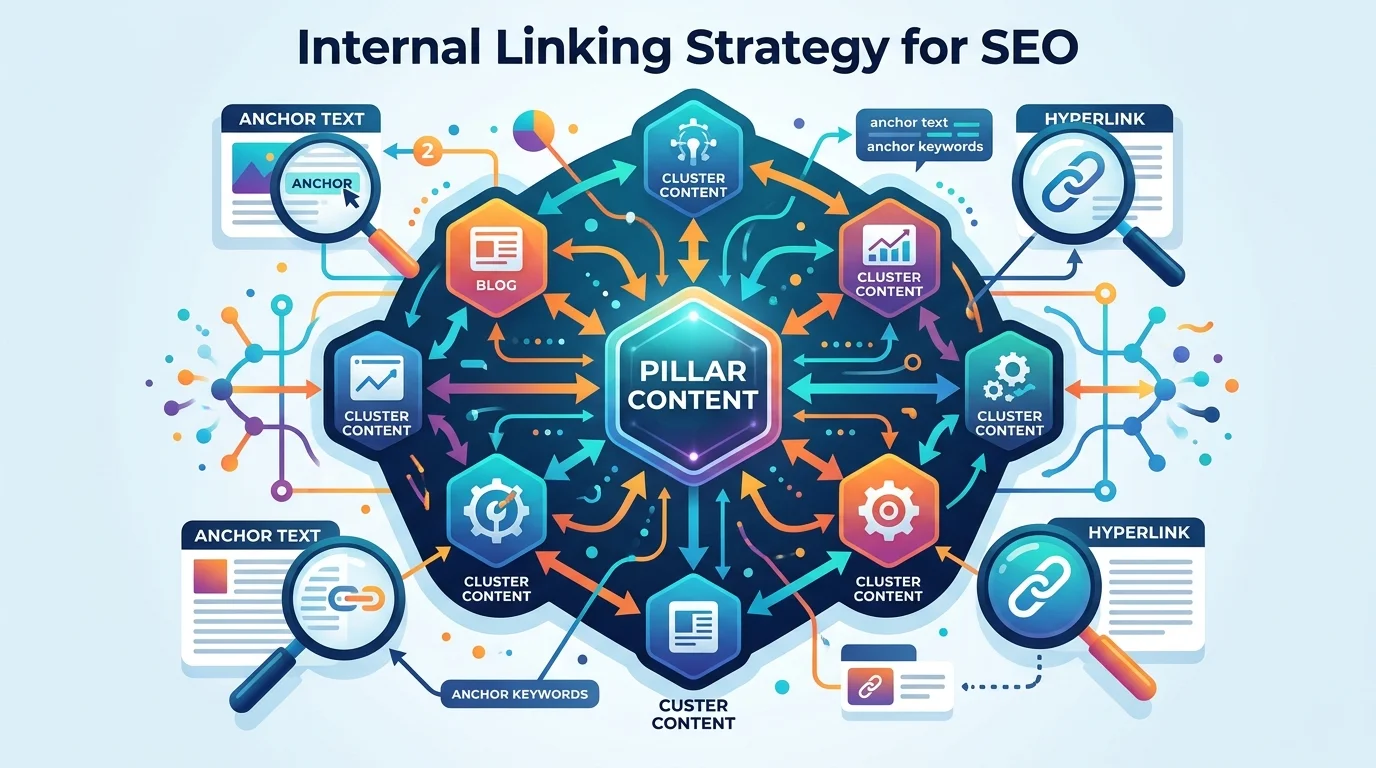
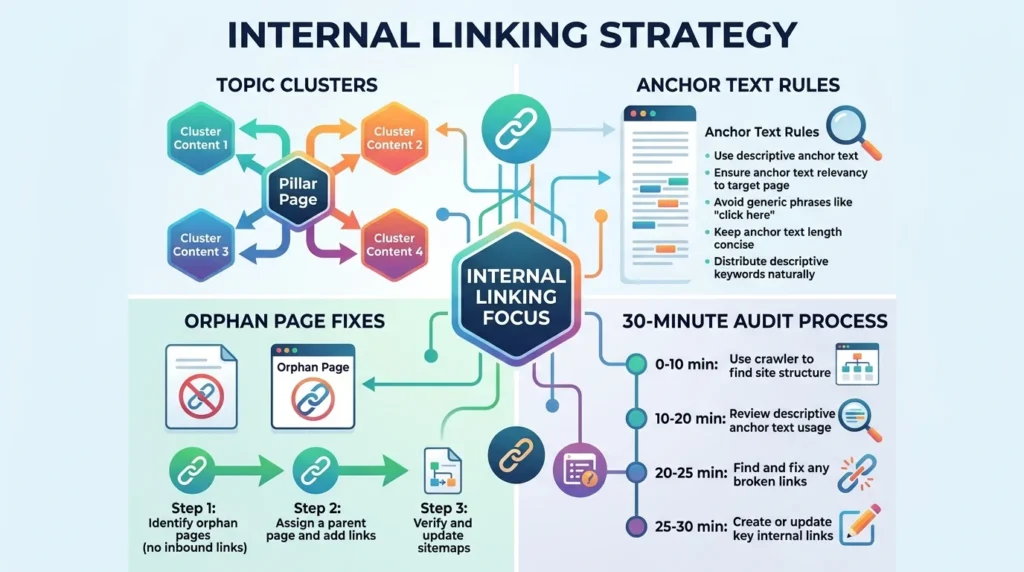
The most practical structure for a business website is the topic cluster, sometimes called hub and spoke. It turns a loose collection of pages into a clear map that both visitors and search engines can follow.
Start With Your Money Pages
List the pages that generate business: service pages, key product categories, location pages and your main contact or quote page. These are the hubs. For an agency, that might be SEO, web design, ecommerce and AI automation pages. For a clinic, each treatment or department page.
Group Supporting Content Around Each Hub
Assign every article to the hub it supports. An article on SEO costs, another on how long SEO takes and another on technical audits all belong to the SEO hub. A guide to website costs and a redesign checklist belong to the web design hub. Some articles will fit two hubs; pick the primary one. This mapping is the heart of topic clusters internal linking, and it often reveals hubs with no supporting content at all, which is useful input for your content marketing strategy.
Link Up, Sideways and Down
Within each cluster, apply a simple rule. Every supporting article links up to its hub, ideally within the body text and early enough that readers see it. Related articles link sideways to each other where it genuinely helps the reader. And the hub links down to its most useful supporting articles, so visitors who need more detail can find it. Pillar guides that cover a topic broadly can sit between the service page and the detailed articles, linking in both directions.
The result is a structure where authority from any article in the cluster flows toward the service page, and readers can move naturally from learning to buying.
Anchor Text Rules for Internal Links
Anchor text is the clickable text of a link. Google uses it to understand the destination, so choosing anchor text internal links carefully is part of every good internal linking strategy.
Make anchors descriptive. “Our SEO services in Lebanon” tells readers and Google exactly where the link goes; “click here” and “read more” tell them nothing. Keep anchors natural and varied. You do not need the exact target keyword every time, and repeating the same exact phrase dozens of times across a site reads as over-optimised. Use variations that fit the sentence: “SEO audit”, “a professional SEO audit”, “what an audit includes”.
Match the anchor to the page’s main topic. If two different pages are both linked with the anchor “web design Lebanon”, you are sending mixed signals about which one should rank. Decide which page owns each important term and use that anchor for that page only. On multilingual sites, write anchors in the page’s own language; an Arabic article should link with Arabic anchor text, a French article with French.
Finding and Fixing Orphan Pages
Orphan pages are pages with no internal links pointing to them. They often appear after redesigns, when old menus are removed, or when landing pages are created for campaigns and then forgotten.
To find them, compare two lists: the URLs in your XML sitemap and the URLs a crawler can reach by following links from your homepage. Pages that appear in the sitemap but not in the crawl are likely orphans. Tools such as Screaming Frog or Sitebulb make this comparison straightforward, and our technical SEO audit checklist includes it as a standard check.
For each orphan, decide whether it deserves to exist. If it is valuable, link to it from its relevant hub and from one or two related articles. If it is outdated or duplicated, redirect it to the most relevant page or remove it. Either way, the goal is a site where every indexable page is reachable through normal links.
Where to Place Internal Links?
Not all link placements are equal. Contextual links inside the main body of a page, surrounded by relevant text, generally carry the clearest signal and get the most clicks. Navigation and footer links are important for usability, but because they appear on every page they do not single out any one page as especially important.
Breadcrumbs help both users and search engines understand hierarchy, and pairing them with breadcrumb structured data, explained in our guide to schema markup, reinforces that structure. “Related articles” sections are useful if they are curated by topic rather than generated by date. On service pages, a short hand-picked list of supporting guides is far more effective than an automatic feed of the latest blog posts.
Internal Linking on Multilingual Sites
Businesses in Lebanon often run English, Arabic and French versions of their sites, which adds a layer to any internal linking strategy. Each language version should have its own complete internal link structure: Arabic articles link to Arabic service pages, French to French. Linking an Arabic article to an English service page sends readers to the wrong language and weakens the Arabic cluster.
The language switcher and hreflang annotations connect equivalent pages across languages, but they do not replace contextual internal links within each language. Our guide to multilingual SEO in English, Arabic and French covers the hreflang side; internal linking handles the rest.
A 30-Minute Internal Link Audit
You do not need specialist software to start an internal linking strategy. Set aside half an hour and work through these checks:
- Open the Links report in Search Console and look at “Top linked pages” under internal links.
- Find your money pages in that list and note any that sit low or are missing.
- Pick five strong articles with good traffic and add one contextual link from each to the right service page.
- Check two service pages to confirm they link down to their best supporting guides.
- Replace vague anchors such as “click here” with descriptive text on your top pages.
Our Google Search Console guide explains where to find the Links report. Repeat this audit quarterly, and every time you publish a new article, add at least one link to it from an existing related page and one link from it to its hub.
Common Internal Linking Mistakes
A few habits undermine even a well-planned internal linking strategy. Adding dozens of links to every paragraph dilutes their value and overwhelms readers; link where it genuinely helps. Using nofollow on internal links wastes the signal you are trying to pass and has no benefit for your own pages. Linking to URLs that redirect, or to pages set to noindex, sends authority on a detour or into a dead end; update links to point at the final, indexable URL. Building navigation purely with JavaScript that does not output standard HTML links can make it harder for Google to follow. And forgetting to update links after a redesign or URL change is one of the most common causes of orphaned service pages.
How to Measure the Results?
Internal linking changes usually show their effect over several weeks. Track the target service pages in Search Console: impressions, average position for their main queries and clicks. In analytics, watch how many visitors move from articles to service pages and on to your contact page or WhatsApp. If a service page starts appearing for more relevant queries and receiving more visits from your own articles, your internal linking strategy is working.
Frequently Asked Questions
It is a deliberate plan for how pages on your site link to each other, designed to help search engines discover and understand your content and to pass authority to your most important pages. For businesses, it usually means organising content into topic clusters that point toward service pages.
There is no fixed number. Add links where they genuinely help readers continue their journey or understand a topic. A typical long article might include several contextual links to related pages and at least one to its main service page; avoid stuffing links into every sentence.
Use descriptive anchors that clearly describe the destination, with natural variation. Occasional exact-match anchors are fine, but repeating the identical keyword phrase everywhere looks unnatural and adds little value.
Orphan pages have no internal links pointing to them. Google may crawl them rarely and treat them as unimportant, and visitors cannot find them through normal navigation. Link valuable orphans from relevant pages, and redirect or remove the rest.
Run a quick audit every quarter and after any redesign, migration or major content update. Each time you publish a new article, link to it from at least one relevant existing page and link from it to its hub page.
Make Your Content Work for Your Service Pages
Every article you publish is an opportunity to strengthen the pages that bring in business. A clear internal linking strategy, built on topic clusters, descriptive anchors and regular audits, makes sure that opportunity is not wasted. It is one of the fastest, lowest-cost improvements most business websites can make.
If you would like an expert to map your clusters, find orphan pages and restructure your internal links in English, Arabic and French, the Creative 4 All team can help. Explore our SEO services in Lebanon