A furniture showroom in Dbayeh sends its monthly newsletter to 8,000 customers. Open rates drop from healthy to almost nothing over two months. Then the accountant mentions that clients keep finding invoices in their spam folders. Nothing changed in the emails themselves. What changed is that Gmail, Yahoo and Outlook now expect every serious sender to prove who they are, and the showroom’s domain could not.
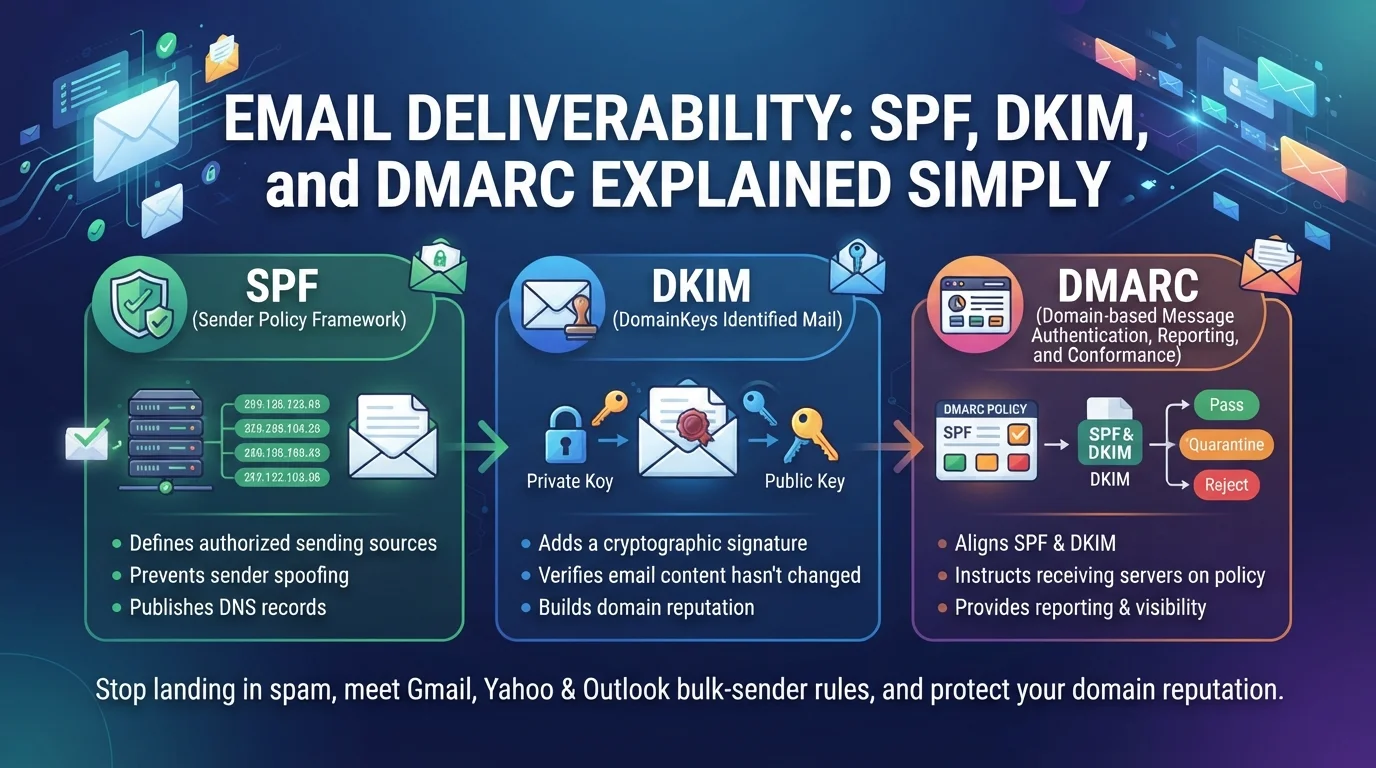
That proof is what email deliverability: SPF, DKIM and DMARC is about. These three DNS records tell mailbox providers that emails claiming to come from your domain really do, and they are now a basic requirement rather than an advanced option. This email deliverability guide explains each one in plain language, shows how to set them up correctly, covers the bulk-sender rules enforced by Gmail, Yahoo and Microsoft, and explains how to monitor your reputation so your emails keep reaching inboxes.
Why Your Emails Are Going to Spam?
When people ask why are my emails going to spam, the cause usually falls into one of three groups. The first is authentication: your domain lacks SPF, DKIM or DMARC records, or they are misconfigured, so providers cannot verify you. The second is reputation: recipients mark your emails as spam, you send to old or purchased lists, or your sending volume jumps suddenly. The third is content and format: misleading subject lines, broken links, image-only emails or missing unsubscribe options.
Authentication is the foundation of email deliverability. Without it, even excellent content and clean lists struggle. With it, good email deliverability becomes a matter of sending wanted emails consistently.
Email Authentication Explained Simply
Email authentication works like a set of credentials attached to every message. Think of three separate checks, each answering a different question.
SPF: Who Is Allowed to Send?
SPF (Sender Policy Framework) is a DNS record listing the servers and services allowed to send email for your domain, for example Google Workspace, Microsoft 365, your newsletter platform and your website’s mail service. When a message arrives, the receiving server checks whether it came from an approved source.
A typical record looks like
v=spf1 include:_spf.google.com include:servers.mcsv.net ~all
. Your domain should have exactly one SPF record. A common problem is SPF too many DNS lookups: the standard allows a maximum of ten DNS lookups when evaluating the record, and businesses that add every tool they have ever used often exceed it, which causes SPF to fail. Remove services you no longer use and consolidate where possible.
DKIM: Was the Message Altered?
DKIM (DomainKeys Identified Mail) adds a digital signature to each email. Your email provider gives you a public key to publish in DNS, and receiving servers use it to confirm the message really came from your domain and was not altered in transit. Every service that sends on your behalf, including your newsletter tool, should be set up to sign with your own domain rather than its default domain.
DMARC: What Should Happen If Checks Fail?
DMARC (Domain-based Message Authentication, Reporting and Conformance) ties SPF and DKIM together. It checks that at least one of them passes and aligns with the domain shown in the From address, then tells receiving servers what to do if checks fail: nothing yet (
p=none
), treat the message as suspicious (
p=quarantine
) or reject it (
p=reject
). It also sends you reports showing who is sending email using your domain.
How to Set Up DMARC for a Business Domain?
A careful DMARC setup avoids blocking your own legitimate emails. Follow these steps:
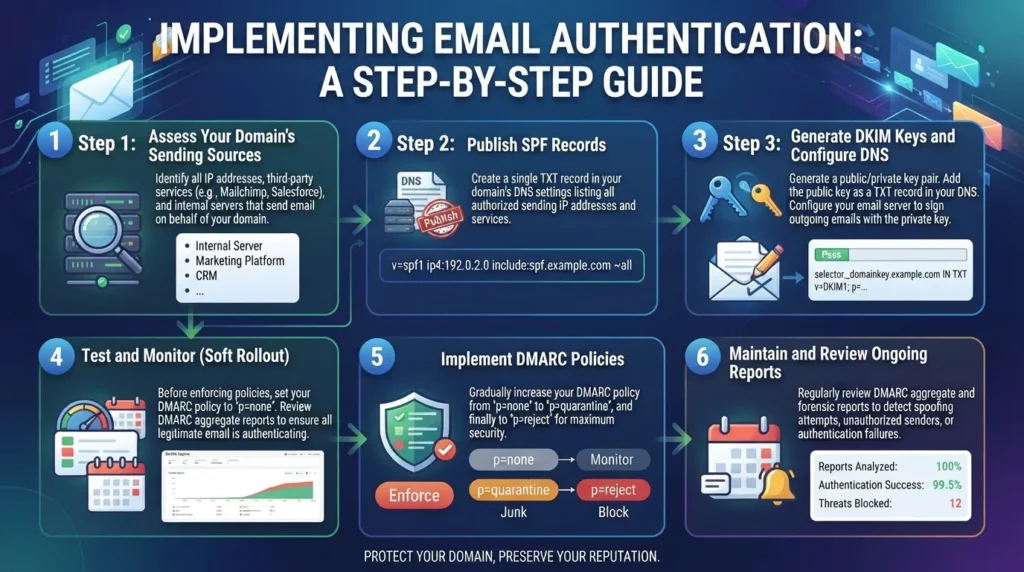
- List every service that sends email as your domain: mailboxes, newsletters, CRM, website forms, invoicing and support tools.
- Configure SPF and DKIM for each service, using your own domain for signing.
- Publish a DMARC record at p=none with a reporting address, for example
v=DMARC1; p=none; rua=mailto:dmarc@yourdomain.com. - Review reports for a few weeks and fix any legitimate senders that fail.
- Move gradually to p=quarantine, then p=reject once legitimate mail passes consistently.
This gradual path matters for email deliverability. Jumping straight to p=reject before every legitimate sender is authenticated can block your own invoices, newsletters or password resets overnight. Taking a few weeks to review reports first protects email deliverability while still moving you toward full protection against spoofing, which is the goal for every business domain.
Raw DMARC reports are XML files that are hard to read, so most businesses use a free or paid DMARC reporting service to turn them into simple dashboards. Moving to an enforced policy also protects your brand, because it makes it much harder for scammers to send fake emails pretending to be your company, a growing risk for banks, clinics and ecommerce stores.
Gmail Bulk Sender Requirements and Other Provider Rules
Gmail bulk sender requirements, introduced by Google and Yahoo in early 2024 and now strictly enforced, changed the baseline for everyone. Microsoft applied similar rules to Outlook.com, Hotmail and Live addresses from May 2025. Google and Microsoft define bulk senders as those sending around 5,000 or more messages a day to their users, but the safest approach is to follow the same rules whatever your volume.
According to the providers’ published guidelines, bulk senders should:
- Authenticate with SPF, DKIM and DMARC, with DMARC at least at p=none.
- Align SPF or DKIM with the domain in the From address.
- Offer one-click unsubscribe through List-Unsubscribe headers (RFC 8058) and honour requests within two days.
- Keep spam complaint rates low, below 0.3% and ideally under 0.1%, as measured in Google Postmaster Tools.
Non-compliant mail now faces spam-folder placement or outright rejection. Most reputable email platforms support one-click unsubscribe headers automatically, but you still need to configure your domain’s authentication yourself.
Common Setups for Businesses in Lebanon and the GCC
Many businesses in Lebanon and the Gulf run a mix of systems that complicate email deliverability: SPF, DKIM, DMARC setups. Email may be hosted on cPanel with the website, while newsletters go through a separate platform and invoices come from accounting software. Website contact forms often send through the web server without proper authentication, which is why form notifications and order confirmations frequently disappear into spam.
The fix is to inventory every sender and authenticate each one. Business mailboxes usually work best on a dedicated provider such as Google Workspace or Microsoft 365. Website emails should be sent through an authenticated SMTP or transactional email service rather than the server’s default mail function. DNS changes are made wherever your domain’s DNS is managed, which may be your registrar, your hosting provider or a service such as Cloudflare; our guide to domain names explains how domains and DNS fit together.
Protecting Sender Reputation and Email Deliverability
Authentication proves identity; reputation proves you are wanted. Send only to people who opted in, and never use purchased lists. Remove addresses that bounce and contacts who have not opened or clicked for a long period. Increase volume gradually when you start sending from a new domain or platform. Make it easy to unsubscribe, because people who cannot leave easily click “report spam” instead.
Consider separating marketing and transactional email, for example by using a subdomain such as news.yourdomain.com for newsletters, so a dip in marketing reputation does not affect invoices and password resets. Our article on email marketing best practices covers list building and content in more depth, and our guide to marketing automation shows how to keep automated sequences relevant.
Monitoring Email Deliverability
Set up Google Postmaster Tools for your domain to track spam rate, reputation and authentication results for Gmail recipients. Review DMARC reports monthly to spot unknown senders or failing services. Watch bounce rates and spam complaints in your email platform, and test new campaigns with seed addresses at Gmail, Outlook and Yahoo before large sends. A sudden drop in opens is often the first sign of a deliverability problem, so investigate quickly rather than assuming the content is to blame.
Common Email Deliverability Mistakes
The same issues appear in most audits:
- Two SPF records on one domain, which breaks SPF entirely.
- Exceeding the ten-lookup SPF limit with old services.
- Newsletter tools signing with their own domain instead of yours.
- DMARC published and never reviewed, or jumped straight to p=reject.
- Website forms sending unauthenticated mail from the web server.
Each is quick to fix once identified, and fixing them often restores inbox placement within days or weeks.
Frequently Asked Questions
The most common causes are missing or misconfigured SPF, DKIM and DMARC records, poor sender reputation from complaints or old lists, sudden volume spikes and content problems such as misleading subject lines. Start by checking your domain’s authentication records, then review your list quality and complaint rates.
Yes. Even if you send far fewer than 5,000 emails a day, mailbox providers increasingly expect authenticated mail from all senders, and DMARC protects your brand from spoofing. Start with p=none, review reports and tighten the policy gradually.
Senders of roughly 5,000 or more messages a day to Gmail must authenticate with SPF, DKIM and DMARC, align the From domain, offer one-click unsubscribe honoured within two days and keep spam complaint rates below 0.3%, ideally under 0.1%. Yahoo and Microsoft apply similar rules.
Remove services you no longer use, avoid duplicate includes, and consolidate senders where possible. Some providers offer SPF flattening, but it needs maintenance when providers change their IP ranges. Keep one SPF record per domain with no more than ten lookups.
Fixing authentication can improve inbox placement within days, while rebuilding a damaged reputation usually takes several weeks of consistent sending to engaged recipients with low complaint rates.
Get Your Emails Back in the Inbox
Most deliverability problems are not mysterious. They come from missing authentication, unmanaged senders and lists that no longer want your emails. Getting email deliverability, SPF, DKIM and DMARC right gives every campaign, invoice and confirmation a fair chance of reaching the people who need it.
If your emails are landing in spam, or you are not sure how your domain is set up, the Creative 4 All team can check your DNS records, configure SPF, DKIM and DMARC across all your sending tools and set up monitoring. Explore our email marketing services in Lebanon and our web hosting and domain services, and request an email deliverability check through the form.