

Every website needs somewhere to live, and that basic requirement hides a decision with real consequences for speed, reliability, and cost. The shared vs VPS vs dedicated hosting question comes up early in almost every website project, and it’s one businesses often answer based on whatever a developer defaulted to rather than what the site actually needs. Getting it wrong in either direction has real costs — an underpowered plan that can’t handle traffic spikes or a security incident, or an oversized, overpriced server sitting mostly idle because a five-page brochure site never needed that much horsepower in the first place.
This guide walks through what each hosting type actually means in practice, how to match the right one to your site’s traffic and technical needs in the shared vs VPS vs dedicated hosting decision, the real cost and performance tradeoffs between them, and the signals that tell you it’s time to upgrade.
What Each Hosting Type Actually Means?
Shared Hosting
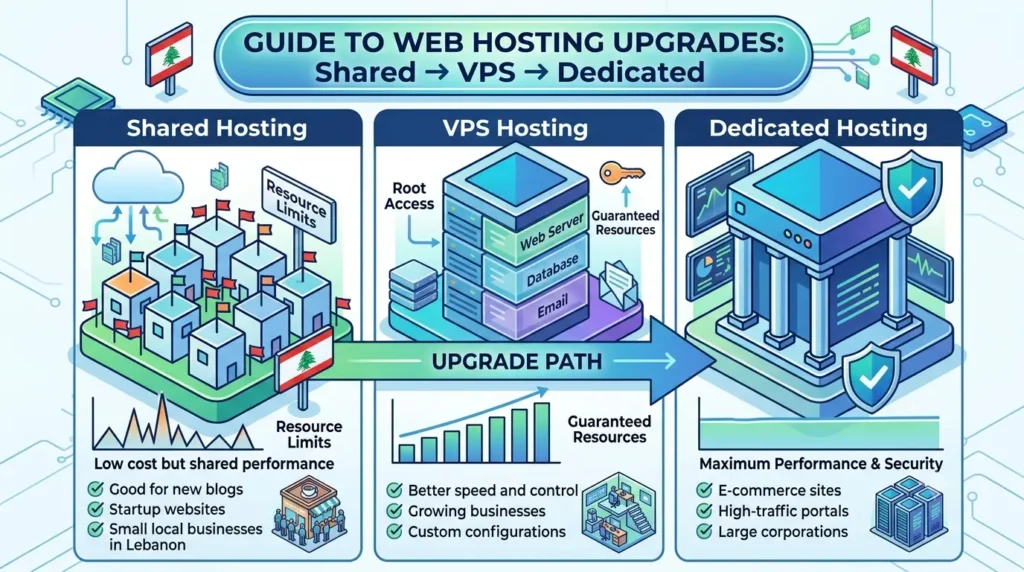
Shared hosting places a website on a server alongside many other websites, all drawing from the same pool of CPU, memory, and bandwidth resources. It’s the most affordable option by a wide margin, and for a large share of small business websites — a basic brochure site, a local service business with modest traffic, a blog without heavy media — it’s genuinely sufficient. The tradeoff is that performance can be affected by other sites on the same server, and the resources available to any single site are limited by design, since the hosting provider is spreading capacity across many customers.
VPS Hosting
VPS, or Virtual Private Server, hosting still shares a physical machine with other customers, but partitions it into isolated virtual environments, each with dedicated CPU, memory, and storage allocations that aren’t affected by other tenants on the same physical hardware. This middle-ground option suits businesses that have outgrown shared hosting’s resource limits, need more control over server configuration, or run applications with specific technical requirements that a shared environment can’t accommodate. VPS costs more than shared hosting but substantially less than a dedicated server, making it the most common upgrade path for growing businesses.
Dedicated Hosting
Dedicated hosting provides an entire physical server exclusively to one customer, with no resource sharing at all. This is the most expensive tier, but it delivers the highest performance ceiling, the most complete control over server configuration and security, and the most predictable performance under heavy load, since nothing else running on the hardware can affect it. Dedicated hosting typically makes sense for high-traffic ecommerce operations, applications with heavy computational demands, or businesses with strict compliance or security requirements that justify the added cost and complexity.
Cloud Hosting
Cloud hosting doesn’t fit neatly into the shared-VPS-dedicated hierarchy, since it works differently: rather than a fixed allocation on a single server, cloud hosting draws resources from a distributed network of servers that can scale up or down based on real-time demand. It’s increasingly common as a flexible alternative to VPS or dedicated hosting for businesses whose traffic fluctuates significantly, since capacity can expand automatically during a traffic spike rather than requiring a manual upgrade in advance. This also means cloud hosting billing typically reflects actual resource usage rather than a fixed monthly allocation, which can make costs harder to predict month to month but often works out more efficient for businesses with genuinely variable traffic patterns, such as seasonal retailers or businesses running periodic marketing campaigns that drive short-term spikes.
Matching Hosting Type to Traffic and Technical Needs
The right choice depends less on business size in the abstract and more on the specific combination of traffic volume, application complexity, and technical requirements a site actually has. A straightforward corporate website with moderate traffic and no custom application logic rarely needs more than shared hosting or an entry-level VPS plan, regardless of how large or established the business behind it is. A growing ecommerce store processing consistent order volume, or a web application with custom backend logic, typically outgrows shared hosting’s resource ceiling well before the business itself feels “big” in any other sense.
Technical requirements matter as much as raw traffic. A site needing specific server-level configurations, custom software installations, or particular security certifications often needs the control that VPS or dedicated hosting provides, even if its traffic volume alone wouldn’t otherwise justify the upgrade. Conversely, a high-traffic but technically simple site — heavy on static content, light on custom logic — can sometimes run comfortably on a well-configured VPS or cloud plan without needing a full dedicated server.
Cost and Performance Tradeoffs
Cost scales predictably across these tiers: shared hosting is the cheapest, VPS costs meaningfully more, and dedicated hosting costs the most by a wide margin, with cloud hosting typically priced based on actual resource consumption rather than a fixed monthly tier. The performance curve follows a similar pattern, but not in perfect lockstep with cost — a well-configured VPS plan can outperform a poorly optimized dedicated server, and the quality of the hosting provider’s infrastructure and support matters as much as the tier itself.
The tradeoff isn’t just about raw performance, though. Shared hosting offers the least control and the least isolation from other customers’ issues, but requires no server management expertise at all. Dedicated hosting offers complete control, but that control comes with responsibility for configuration, security patching, and maintenance unless a managed hosting plan is layered on top. VPS sits in between on both axes, offering meaningfully more control than shared hosting without the full management burden of a dedicated server. Evaluating hosting purely on price, without weighing this control-versus-management-burden tradeoff, often leads a business to choose a tier that’s technically capable but operationally mismatched to their in-house capacity to manage it.
Hosting Considerations Specific to Lebanon and the GCC
The shared vs VPS vs dedicated hosting decision has a regional dimension that generic global guides don’t cover. Server location affects load times meaningfully for a Lebanese audience, and businesses splitting their audience between Lebanon and the broader GCC region need to weigh whether a server located closer to one audience creates a noticeably slower experience for the other. Many hosting providers now offer data center options across the Middle East specifically to address this, and checking actual latency to your primary audience matters more than defaulting to whichever region a hosting plan ships with by default.
Local internet infrastructure and connectivity patterns in Lebanon can also make the choice between hosting tiers matter more than it might in markets with more uniformly fast connections — a slow-loading shared hosting plan compounds with already variable local connection speeds in a way that’s worth testing directly rather than assuming international benchmarks apply evenly. Businesses serving both Lebanese and GCC customers, or planning that expansion, often find that a VPS or cloud plan with server options closer to each target market offers more flexibility than a single shared hosting plan tied to one fixed location.
When to Upgrade?
Deciding where you fall in the shared vs VPS vs dedicated hosting spectrum isn’t a one-time decision — a handful of concrete signals suggest a site has outgrown its current hosting tier well before an outright outage forces the issue. Consistently slow load times that don’t improve with basic optimization — image compression, caching, removing unnecessary plugins — often point to a resource ceiling rather than a configuration problem. Frequent downtime or performance degradation during traffic spikes, particularly around predictable high-traffic periods like sales promotions or seasonal demand, signals that current capacity isn’t keeping pace with actual usage. Needing server-level access or configurations that a shared hosting plan simply doesn’t allow — custom software, specific PHP or database configurations, dedicated IP requirements — is a clear sign that VPS or dedicated hosting has become necessary regardless of traffic volume alone.
It’s worth reviewing hosting fit periodically rather than only reacting to a problem, since a site’s technical needs and traffic patterns shift gradually enough that the moment it actually outgrows its hosting tier isn’t always obvious until performance has already been suffering for a while.
Frequently Asked Questions
For most small business websites with moderate traffic and no complex custom applications, yes. Shared hosting becomes a limitation specifically when traffic grows significantly, when the site needs server-level configuration control, or when consistent performance under load becomes critical to the business.
VPS provides a fixed allocation of resources on a partitioned server, while cloud hosting draws from a distributed pool of resources that can scale dynamically based on demand. VPS offers more predictable costs; cloud hosting offers more flexibility for fluctuating traffic.
Not necessarily, especially for a smaller or mid-sized store. A well-configured VPS or cloud hosting plan can handle substantial ecommerce traffic; dedicated hosting typically becomes worthwhile at higher volume or when specific performance and security requirements justify the added cost.
A well-planned migration can minimize downtime significantly, though some brief service interruption is typically unavoidable during the transition. Planning the migration during low-traffic periods and testing thoroughly before fully switching over reduces the risk of extended disruption.
Slow performance can stem from unoptimized images, poor code, excessive plugins, or genuine hosting resource limits. Testing site speed after basic optimization steps helps isolate whether the bottleneck is hosting capacity or something fixable without an upgrade.
Ready to Choose the Right Hosting for Your Business?
Choosing between shared, VPS, dedicated, or cloud hosting — the core of any shared vs VPS vs dedicated hosting decision — should be based on your site’s actual traffic, technical needs, and growth plans, not a default recommendation. Talk to a hosting specialist at Creative 4 All and get a clear recommendation built around what your business actually needs.