
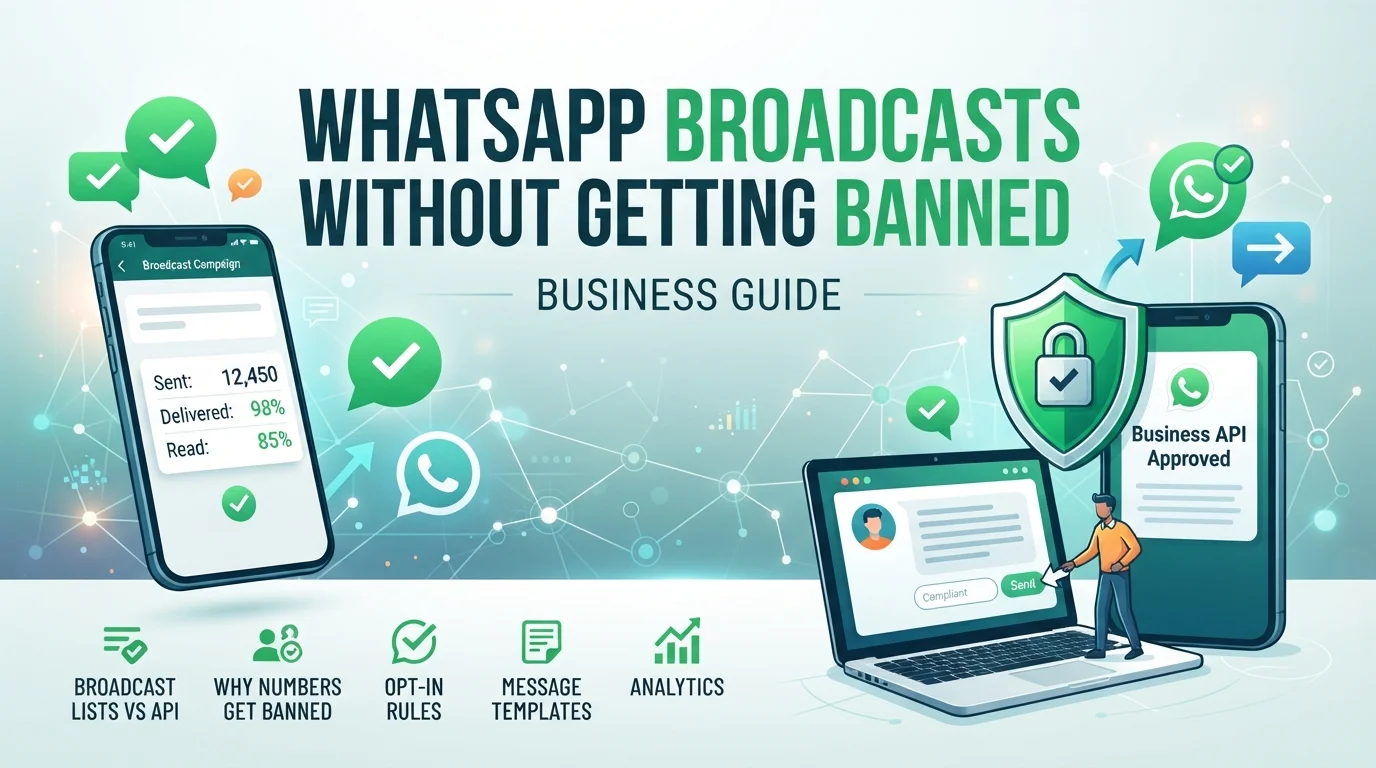
For many businesses in Lebanon, WhatsApp is not just a marketing channel. It is the shop counter, the booking desk and the customer service line, all on one phone number. That is exactly why a ban hurts so much. A retailer sends a promotion to a few thousand contacts on a Friday, and by Saturday morning the number that receives every order shows a message saying it is no longer allowed to use WhatsApp.
The good news is that sending a WhatsApp broadcast without getting banned is not a matter of luck or secret tricks. Bans follow predictable patterns: messages sent without consent, the wrong tools, sudden spikes in volume, and recipients who block or report the business. This guide explains how WhatsApp decides which numbers to restrict, the difference between the Business app and the WhatsApp Business Platform (often called the API), and a practical, compliant way to run WhatsApp marketing for business at scale.
Why WhatsApp Numbers Get Banned?
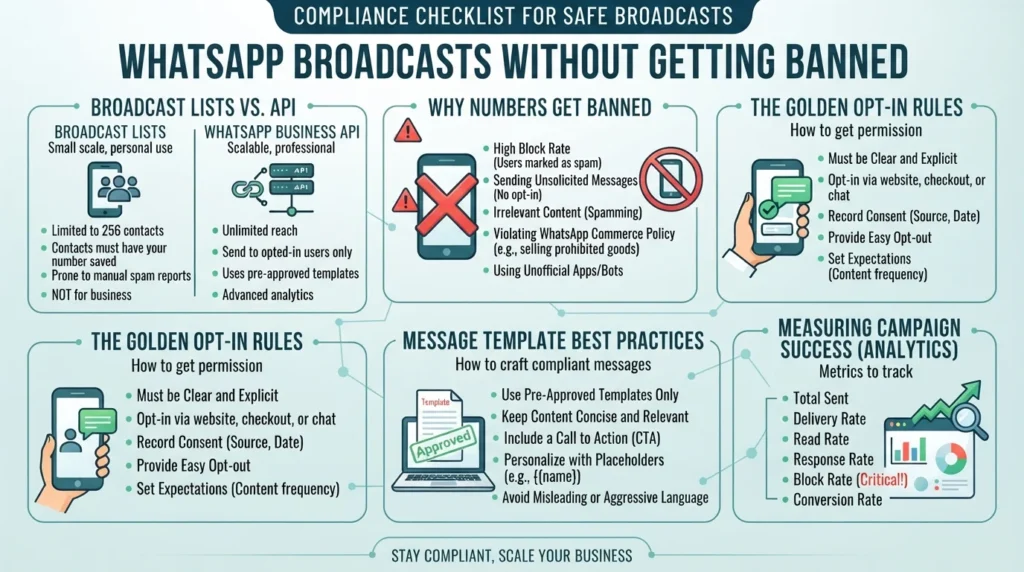
To send a WhatsApp broadcast without getting banned, you first need to understand what triggers a ban. WhatsApp’s systems watch for behaviour that looks like spam. The exact signals are not public, but WhatsApp’s policies and help pages make the main causes clear:
- Messaging people who did not ask to hear from you. Bought lists, scraped numbers, or contacts collected for one purpose and used for another.
- High block and report rates. When many recipients block your number or tap “Report”, WhatsApp treats it as a strong sign that your messages are unwanted.
- Unofficial or modified tools. Bulk-sending browser extensions, “WhatsApp senders” and modified versions of the app break WhatsApp’s terms and are a frequent cause of permanent bans.
- Sudden volume spikes. A new or quiet number that suddenly messages thousands of people looks automated.
- Identical messages to many strangers. The same text, the same link, sent to people who have never chatted with you.
- Policy breaches. Promoting restricted products or services listed in WhatsApp’s Business and Commerce policies.
If your WhatsApp number was banned, the cause is almost always one or more of these. Understanding them is the first step to staying safe.
Three Ways to Send Messages, and Their Limits
Businesses usually send promotions in one of three ways. They carry very different risk levels.
1. A Personal WhatsApp Number
Using a personal number for business promotions is the riskiest option. It has no business profile, no catalogue, no proper tools for consent or opt-out, and it breaks the spirit of WhatsApp’s terms when used for mass marketing. Meta has also been testing caps on how many broadcast messages individual users can send. For any business sending promotions, this route should be retired.
2. The WhatsApp Business App
The free Business app adds a business profile, catalogue, quick replies, labels and broadcast lists. It works well for small businesses with a manageable number of customers, but it has important limits:
- Broadcast lists only reach people who saved your number. A contact who has not added you to their phone will not receive the broadcast, which naturally limits reach to people who already know you.
- Lists have size limits, and the app is designed for one phone, or a small number of linked devices, rather than a team.
- Broadcast features are changing. Meta has announced and been testing paid broadcast tools and limits for Business app accounts, so check the current rules in your app before planning large campaigns.
Understanding these WhatsApp broadcast list limits matters. The app is suitable for occasional updates to loyal customers, not for high-volume campaigns.
3. The WhatsApp Business Platform (API)
The WhatsApp Business Platform is Meta’s official solution for medium and large businesses. You access it directly through Meta’s Cloud API or through an approved Business Solution Provider, and connect it to a CRM, a shared inbox, a chatbot or an ecommerce platform. It supports approved message templates, many team members, automation and reporting.
For businesses that want to send WhatsApp bulk messages legally and at scale, this is the right route. It does not remove the rules; it gives you a structured system for following them.
How the WhatsApp Business Platform Controls Marketing?
The platform has several built-in controls. Understanding them explains most of what “without getting banned” means in practice.
Message Templates
Outside an open conversation, businesses can only start a chat with a pre-approved message template. Templates are reviewed by Meta and fall into categories, mainly marketing, utility (such as order updates) and authentication (such as one-time codes). A promotion must be submitted as a marketing template. Mislabelling a promotion as a utility message is a policy breach and can lead to the template, or the account, being restricted.
The Customer Service Window
When a customer messages you, a 24-hour customer service window opens. Within it, you can reply freely without a template. This is why encouraging customers to start conversations, through click-to-WhatsApp ads, website buttons or QR codes, is so valuable.
Messaging Limits
Meta limits how many unique customers a business can message outside the customer service window in a rolling 24-hour period. According to Meta’s current documentation, new business portfolios start at 250, and the limit can rise through tiers of 2,000, 10,000, 100,000 and unlimited. Moving to 2,000 requires completing a scaling path, such as verifying your business; higher tiers increase automatically when you send high-quality messages and use a significant share of your current limit. Limits are shared across all numbers in the same business portfolio.
Quality Rating
Each number and template carries a quality signal based on how recipients respond, especially blocks and reports. Poor quality can pause templates and hold back limit increases. In other words, the platform rewards relevance and punishes spam.
Per-User Marketing Limits
Meta also limits how many marketing messages an individual person receives from businesses, particularly when that person has not been engaging with marketing messages. If a recipient reaches this limit, your message is not delivered, even if your account is in good standing. This is another reason to send fewer, more relevant campaigns.
Opt-In: The Foundation of Safe WhatsApp Marketing
Consent is the single most important factor in running WhatsApp broadcasts without getting banned. WhatsApp’s Business Messaging Policy requires businesses to obtain opt-in before messaging people, and the opt-in should make clear that the person agrees to receive messages from your business on WhatsApp.
Good opt-in sources include:
- A website or checkout checkbox: “Send me order updates and offers on WhatsApp.”
- A click-to-WhatsApp ad or website button where the customer starts the conversation.
- An in-store QR code that opens a chat with a clear message, such as “Join our WhatsApp offers.”
- A reply keyword after a purchase: “Reply YES to receive new arrivals.”
Keep a record of when and how each person opted in. Separate transactional consent (order updates) from marketing consent (offers), and always give an easy way to stop, such as an opt-out button or keyword. Honour opt-outs immediately.
Data protection also matters. Lebanon has rules on personal data within its electronic transactions law, and Saudi Arabia and the UAE have their own personal data protection laws. If you market across the Gulf, review consent and data handling with your legal advisor for each market. This guide is not legal advice.
A Practical Checklist for Sending WhatsApp Broadcasts Without Getting Banned
- Move promotions to the right tool. Use the Business app only for small, warm audiences; use the WhatsApp Business Platform for regular campaigns.
- Verify your business in Meta Business Manager and complete your business profile.
- Clean your list. Remove numbers without clear opt-in, bought lists and contacts who have not engaged in a long time.
- Warm up gradually. Start with your most engaged customers and increase volume over weeks, not in one blast.
- Segment. Send relevant offers to relevant groups: by location, past purchases, language or interests.
- Write useful templates. Lead with value, keep the message short, personalise it, and include a clear call to action.
- Respect language. In Lebanon and the Gulf, let customers choose Arabic, English or French, and send in that language.
- Mind timing and frequency. Avoid late-night sends, and do not message the same person several times a week. Ramadan and holiday campaigns should respect local rhythms.
- Always include an opt-out and process it at once.
- Monitor quality. Watch block rates, template quality and delivery failures, and pause campaigns that perform poorly.
- Never use unofficial bulk senders or modified apps.
What to Do If Your WhatsApp Number Was Banned?
If your WhatsApp number was banned, stop all sending immediately. In the app, WhatsApp usually offers a way to request a review; explain truthfully how you use the number and how customers opted in. On the Business Platform, check the account status and quality notifications in WhatsApp Manager and follow Meta’s appeal process.
Then fix the cause before resuming. The goal is to send every future WhatsApp broadcast without getting banned, so: remove contacts without opt-in, stop any unofficial tools, rewrite templates and reduce volume. A reinstated number that repeats the same behaviour is likely to be restricted again.
To reduce the business risk, avoid relying on a single personal or app number for all sales. Many businesses keep a dedicated number on the Business Platform for campaigns and customer service, connected to a shared inbox so the whole team can respond.
Beyond a WhatsApp Broadcast Without Getting Banned: Make Campaigns Conversational
The most effective WhatsApp marketing does not end when the message is sent. Customers reply with questions about sizes, prices, delivery and availability, and the reply window is where sales happen. If replies go unanswered for hours, the campaign loses value and recipients are more likely to block.
This is where automation helps. A well-designed chatbot can answer common questions, show products, collect booking details and hand complex conversations to a person. Our WhatsApp AI chatbot guide explains how this works. Connecting WhatsApp to your CRM also lets you segment by real customer data, as covered in our guide to building a CRM strategy.
Measuring WhatsApp Campaign Results
Measure what matters to the business, not only delivery:
- Delivery and read rates for each template.
- Reply rate and how quickly the team responded.
- Click-through rate on links, tracked with UTM parameters.
- Conversions: orders, bookings or qualified enquiries attributed to the campaign.
- Opt-out and block signals, which show when content or frequency needs to change.
Our guide to GA4 lead tracking for WhatsApp explains how to connect WhatsApp activity to your analytics. And because WhatsApp works best alongside other channels, our email marketing best practices and marketing automation guide show how to build a balanced customer communication plan.
Frequently Asked Questions
The most common reasons are messaging people without opt-in, high block or report rates, using unofficial bulk-sending tools or modified apps, sudden spikes in volume, and promoting restricted products. Request a review, then fix the cause before sending again.
Message only people who opted in, use the WhatsApp Business Platform for regular campaigns, start with engaged customers and grow volume gradually, segment your audience, send relevant approved templates, include an opt-out, and monitor quality and block rates.
Business app broadcasts only reach contacts who have saved your number, lists have a maximum size, and Meta has been introducing new limits and paid broadcast tools. Check the current limits in your app before planning a campaign.
Yes, it is Meta’s official platform for business messaging at scale. It still requires opt-in, approved templates and compliance with WhatsApp’s policies and local data protection laws.
Not necessarily. Many businesses connect through a Business Solution Provider or an agency that sets up the account, templates, inbox and integrations. Custom integrations with a CRM or ecommerce platform usually need technical support.
Build a WhatsApp Channel You Can Rely On
Sending WhatsApp broadcasts without getting banned comes down to respecting the people you message: clear consent, relevant content, sensible frequency and the right tools. Businesses that follow these principles protect their most valuable sales line and turn WhatsApp into a dependable, measurable marketing channel.
If you want to move from risky blasts to a compliant, automated WhatsApp setup, the Creative 4 All automation team can set up the WhatsApp Business Platform, templates, opt-in flows, a shared inbox and an AI chatbot, in English, Arabic and French. Explore our AI agents, automation and chatbot services and book a free automation consultation or chatbot demo through the form or on WhatsApp.