

A clinic in Beirut spends money on Google Ads every month. The dashboard shows a handful of form submissions and a cost per lead that looks painful. Meanwhile, the receptionist’s phone is busy and the WhatsApp inbox is full of booking requests, most of which started on the website. The ads are working; the tracking is not, because nobody set up the site to track WhatsApp clicks in GA4.
This gap is common across Lebanon and the Gulf, where many customers prefer to tap a WhatsApp button or call rather than fill in a form. If you cannot track WhatsApp clicks in GA4, along with calls and forms, every decision about ad budgets and SEO is based on a fraction of your real leads. This guide shows how to set up lead tracking with Google Analytics 4 (GA4) and Google Tag Manager (GTM), mark those actions as key events, send them to Google Ads, and understand the limits of what click tracking can tell you.
Why Lead Tracking Breaks for Lebanese and GCC Businesses?
Default GA4 setups measure page views and some engagement, but they do not know which clicks matter to your business. A WhatsApp button is just a link to wa.me or api.whatsapp.com, a phone number is a tel: link, and many contact forms submit without loading a new page. Unless you tell GA4 these actions are important, they disappear into general traffic.
For service businesses, that means lead tracking for service businesses looks far worse than reality. Campaigns that generate dozens of WhatsApp conversations appear to produce nothing, and budgets get cut from the channels that actually work. Our article on how to measure digital marketing ROI explains why incomplete data leads to bad decisions; this guide fixes the data itself.
Plan Your Lead Events Before You Touch GTM
Spend ten minutes defining what you will track and what you will call it. Consistent names make reports readable and Google Ads imports straightforward. A simple plan for most lead-generation sites looks like this:
| Action | Suggested event name | Useful parameters |
|---|---|---|
| WhatsApp button or link click | whatsapp_click | link_url, page_location, button_location |
| Phone number click | phone_click | link_url, page_location |
| Contact or quote form submitted | generate_lead | form_name, page_location |
| Booking completed (if applicable) | book_appointment | service, page_location |
GA4 recommends the event name
generate_lead
for lead form submissions, so it is a sensible choice for your main form. For WhatsApp and phone clicks, custom names such as
whatsapp_click
and
phone_click
keep them distinct in reports.
Google Tag Manager Setup: The Foundations
If you do not use GTM yet, a basic Google Tag Manager setup takes about half an hour and pays for itself immediately, because you can add and change tracking without editing website code.
Create a GTM container for your website, add the container code to every page (most WordPress and Shopify themes, or a plugin, can do this), and add a Google tag inside GTM with your GA4 measurement ID, firing on all pages. Then enable the built-in click variables in GTM, particularly Click URL, Click Text and Click Element, which the triggers below rely on. If your site already loads GA4 directly in the code, remove the duplicate once GTM is live, otherwise every event will be counted twice.
How to Track WhatsApp Clicks in GA4?
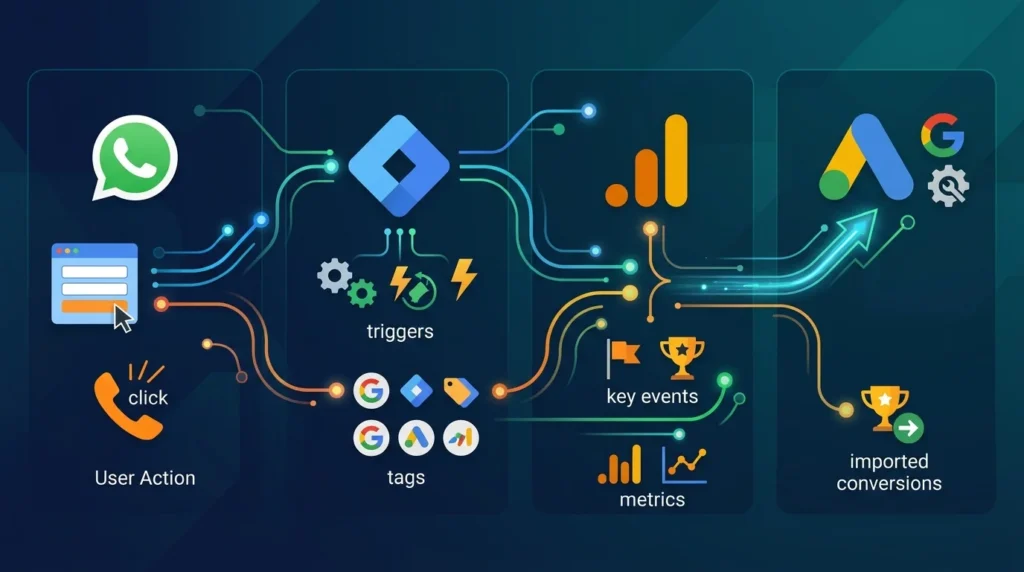
This is the step most guides skip, and the one that matters most for Lebanese businesses. To track WhatsApp clicks (GA4 and GTM), you create a trigger that recognises WhatsApp links and a tag that sends an event.
Step 1: Create the WhatsApp Click Trigger
In GTM, create a new trigger of type Click – Just Links. Set it to fire on some link clicks where Click URL matches the regular expression
wa\.me|api\.whatsapp\.com|web\.whatsapp\.com|whatsapp:
. This covers the common link formats used by WhatsApp buttons, chat widgets and plugins. If your WhatsApp widget opens a chat box instead of a direct link, check which element is clicked using GTM’s preview mode; some widgets need a trigger based on the button’s CSS class or a custom event pushed by the plugin.
Step 2: Create the GA4 Event Tag
Create a new tag of type Google Analytics: GA4 Event, select your Google tag or measurement ID, and set the event name to
whatsapp_click
. Add parameters such as
link_url
with the value {{Click URL}} and
page_location
with {{Page URL}}, so you can see which pages and buttons generate WhatsApp conversations. Attach the WhatsApp click trigger and save.
Step 3: Test Before Publishing
Open GTM’s Preview mode, click the WhatsApp button on your site, and confirm the tag fired. Then check GA4’s DebugView (under Admin) to see the
whatsapp_click
event arrive with its parameters. Only publish the container once you have seen the event in both places. Once live, you can reliably track WhatsApp clicks in GA4 across every page.
Call Tracking in GA4: Click-to-Call Links
Basic call tracking in GA4 follows the same pattern. Create a Click – Just Links trigger where Click URL starts with
tel:
, and a GA4 event tag named
phone_click
with the link URL as a parameter. Test it on a phone, because desktop browsers may handle tel: links differently.
Remember what this measures: someone tapped the number. It does not confirm the call connected or turned into business. Businesses that rely heavily on calls, such as clinics or contractors, may add a call tracking service that shows unique numbers to website visitors and reports completed calls, but click tracking is a free and useful starting point.
Tracking Form Submissions
Forms come in many varieties, so choose the method that fits yours.
Thank-You Page Method
If the form redirects to a dedicated thank-you page, the simplest and most reliable approach is a trigger on Page View where the Page Path equals that thank-you URL, firing a
generate_lead
event. Make sure the thank-you page is not reachable from navigation, or visitors could trigger the event without submitting.
Forms Without a Redirect
Many modern forms show a success message without loading a new page. GTM’s built-in Form Submission trigger works for some of them, but not all. The most reliable option is to have your developer or form plugin push a custom event to the dataLayer when the submission succeeds, for example
dataLayer.push({event: 'form_success', form_name: 'quote'})
, and use a Custom Event trigger in GTM. Popular WordPress form plugins often support this directly or through an add-on.
Avoid relying on GA4’s enhanced measurement “form interactions” as your lead count; it can record form starts and submissions that did not succeed. Use it as a secondary signal at most.
Mark Leads as Key Events in GA4
In GA4, the actions you care most about are called key events (Google renamed “conversions” to “key events” in GA4 in 2024). Once your events have been received, go to Admin → Events (or Key events), find
whatsapp_click
,
phone_click
and
generate_lead
, and mark them as key events. They will then appear in key event reports and can be used for comparisons by channel, campaign and landing page.
This is the heart of GA4 conversion tracking for lead generation: not every click is a key event, only the actions that represent genuine sales opportunities.
Import Your Lead Events Into Google Ads
To let Google Ads optimise for real leads, link GA4 to Google Ads (Admin → Product links → Google Ads links), then in Google Ads go to Goals → Conversions and import the GA4 key events you want to use. Decide which ones should be primary conversions that bidding optimises toward, and which should be secondary for observation only.
A practical approach for many Lebanese businesses is to make form submissions and WhatsApp clicks primary, assign them values that reflect their typical worth, and keep phone clicks primary or secondary depending on how reliably they turn into bookings. For advertisers with enough volume, Google’s enhanced conversions for leads can improve measurement accuracy. Our guide to Google Ads budgets in Lebanon explains why accurate conversions matter before you scale spend.
What Click Tracking Cannot Tell You?
When you track WhatsApp clicks in GA4, you measure intent, not a confirmed lead. Some people tap the button and never send a message; others send a message from a different device. To connect marketing to actual enquiries and sales, many businesses go further: using the WhatsApp Business Platform with a CRM to log conversations, tagging chats by source, or importing qualified leads back into Google Ads as offline conversions. Our breakdown of WhatsApp Business API pricing covers what that next step costs.
Also consider privacy. If you serve visitors in regions with consent requirements, such as the European Union, configure consent mode and a cookie banner so tracking respects user choices. Lebanon’s Law No. 81 of 2018 and Saudi Arabia’s Personal Data Protection Law apply to personal data you collect; click events without personal information are lower risk, but form data and CRM records need proper handling.
Common Tracking Mistakes
A few mistakes appear in almost every audit of businesses trying to track WhatsApp clicks and forms:
- Double counting because GA4 is installed both in the site code and through GTM.
- Untested triggers that miss WhatsApp widgets which do not use standard links.
- Counting form starts or failed submissions as leads.
- Too many key events, such as page scrolls, diluting what counts as a lead.
- Never checking after site updates, when buttons and forms often change.
Re-test your key events after every website redesign, plugin update or new landing page.
Turning the Data Into Decisions
Once you track WhatsApp clicks, calls and forms correctly, build a simple monthly view: key events by channel, campaign and landing page, alongside cost from Google Ads and Meta. Our article on marketing analytics dashboards shows how to present this clearly. You will often find that pages and campaigns you were about to cut are, in fact, your best sources of WhatsApp enquiries.
Frequently Asked Questions
Use Google Tag Manager to create a link-click trigger that matches WhatsApp URLs such as wa.me and api.whatsapp.com, connect it to a GA4 event tag named, for example, whatsapp_click, test it in Preview and DebugView, then mark the event as a key event in GA4.
GA4 can track clicks on phone links (tel:), which shows how many visitors tried to call. It cannot confirm the call connected or what was discussed. For completed-call data, use a dedicated call tracking service alongside GA4.
In 2024 Google renamed GA4 “conversions” to “key events.” Key events are the important actions you mark in GA4, such as leads. In Google Ads, the term conversions is still used for the actions you import and optimise toward.
For many Lebanese and GCC businesses, yes, because WhatsApp is a main lead channel. Assign realistic values, monitor how many clicks turn into real conversations, and adjust if click volume overstates true lead quality.
It is not strictly required, but it makes tracking far easier to set up, test and change without editing code. For tracking WhatsApp, phone and form actions across a site, GTM is the most practical option.
Measure the Leads You Are Already Getting
Most businesses do not have a lead problem as much as a measurement problem. Once you track WhatsApp clicks in GA4, along with calls and forms, and feed those key events into Google Ads, budgets follow reality instead of guesswork, and the channels that genuinely bring enquiries get the investment they deserve.
If you would like your tracking checked, fixed or set up from scratch, the Creative 4 All paid media team can audit your GA4, Tag Manager and Google Ads configuration. Explore our PPC advertising services in Lebanon and request a free paid-media account audit through the form.